
Explain debounce and throttle.
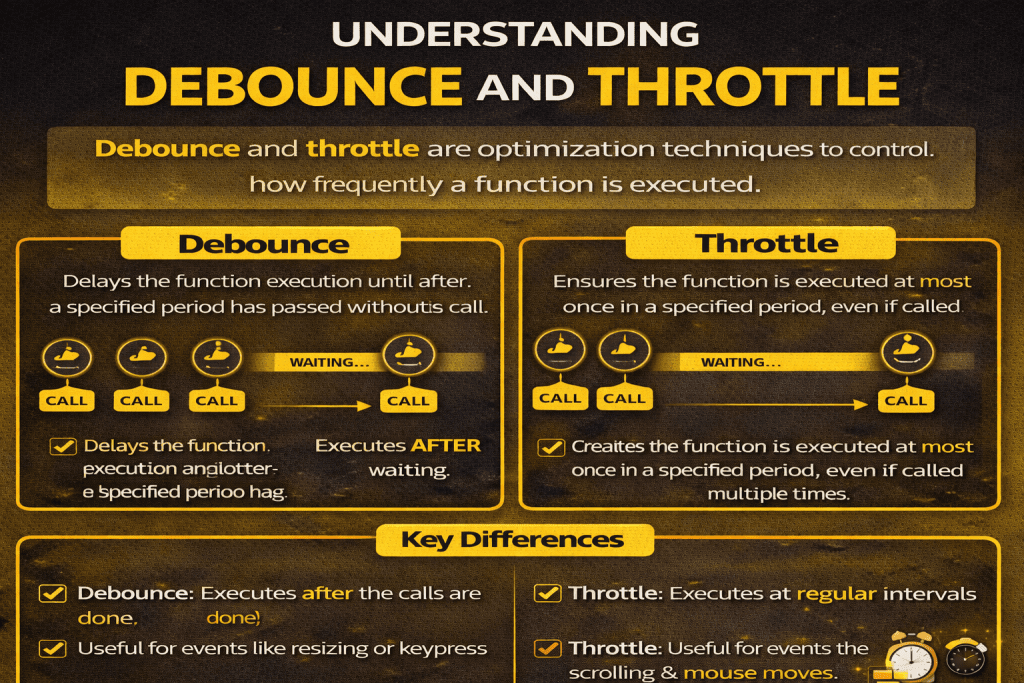
Sure! Debounce and Throttle are two techniques used in JavaScript to control how often a function is executed, especially when dealing with events that can fire very frequently (like scroll, resize, or keyup). They help improve performance and prevent unnecessary function calls. Let’s break them down:
1. Debounce
Definition:
Debounce ensures that a function is executed only after a certain amount of time has passed since the last event. In other words, the function will wait until the events “settle down.”
Use Case:
- Search input auto-suggestions (wait until the user stops typing to send the request).
- Window resize events.
Example:
function debounce(func, delay) {
    let timer;
    return function(...args) {
        clearTimeout(timer);
        timer = setTimeout(() => func.apply(this, args), delay);
    };
}

// Usage
const search = (query) => console.log('Searching for', query);
const debouncedSearch = debounce(search, 300);

document.getElementById('searchBox').addEventListener('input', (e) => {
    debouncedSearch(e.target.value);
});
✅ Key Point: The function executes after the user stops triggering the event for the specified delay.
2. Throttle
Definition:
Throttle ensures that a function is executed at most once in a specified interval, no matter how many times the event occurs.
Use Case:
- Infinite scrolling (load more items as user scrolls, but not on every pixel).
- Scroll animations or performance-heavy events.
Example:
function throttle(func, limit) {
    let lastFunc;
    let lastRan;
    return function(...args) {
        if (!lastRan) {
            func.apply(this, args);
            lastRan = Date.now();
        } else {
            clearTimeout(lastFunc);
            lastFunc = setTimeout(() => {
                if ((Date.now() - lastRan) >= limit) {
                    func.apply(this, args);
                    lastRan = Date.now();
                }
            }, limit - (Date.now() - lastRan));
        }
    };
}

// Usage
const handleScroll = () => console.log('Scroll event triggered');
window.addEventListener('scroll', throttle(handleScroll, 200));
✅ Key Point: The function executes regularly at intervals, even if the event keeps firing.
Quick Comparison
| Feature | Debounce | Throttle |
|---|---|---|
| Execution | After events stop firing | At most once every specified period |
| Use Case | Typing, search, resize | Scrolling, window resize, animations |
| Calls | Single call after idle | Multiple calls at fixed intervals |
If you want, I can also draw a visual timeline showing how debounce vs throttle behaves during frequent events—it makes it super easy to remember.