
Understanding the JavaScript Event Loop: A Complete Guide
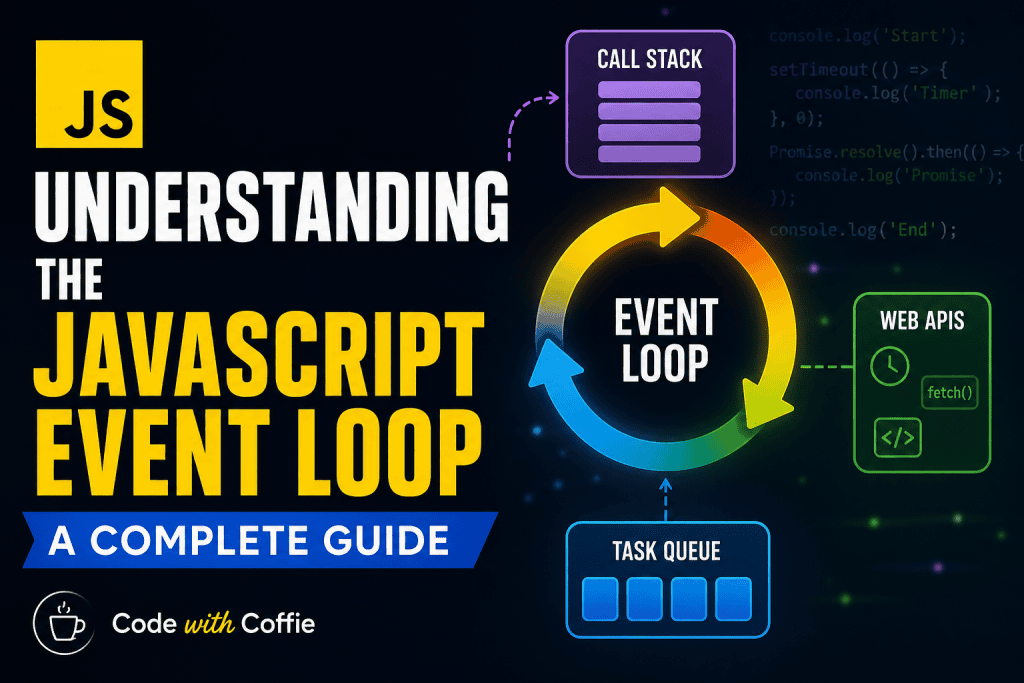
JavaScript is a single-threaded language, which means it can execute one task at a time. But still, we use it to build fast, non-blocking, asynchronous applications (like chat apps, real-time dashboards, etc.).
How is this possible?
👉 The answer lies in the Event Loop.
In this blog, we’ll break down:
- What the Event Loop is
- How it works behind the scenes
- Key components (Call Stack, Web APIs, Callback Queue, Microtask Queue)
- Execution process of tasks
- Example walkthroughs
- Why it’s important
🟢 What is the Event Loop?
The Event Loop is a mechanism that allows JavaScript to perform non-blocking asynchronous operations, despite being single-threaded.
It continuously checks whether the Call Stack is empty, and if so, pushes tasks (callbacks, promises, timers, etc.) from the queue into the stack for execution.
In simple words:
👉 The Event Loop is like a traffic manager that decides when JavaScript should execute which task.
🟢 Key Components of the Event Loop
1. Call Stack (Execution Stack)
A.Stores function calls in order.
B.Works on LIFO (Last In, First Out) principle.
Example:
function a() { console.log("A"); }
function b() { a(); console.log("B"); }
b();
// Execution: a() -> log "A" -> return -> log "B"Web APIs (Browser APIs / Node APIs)
A.These are APIs provided by the environment (browser or Node.js).
B.Examples: setTimeout, DOM events, fetch, setInterval.
C.They run asynchronously and send results back later.
3.Callback Queue (Task Queue / Macrotask Queue)
A.Stores callbacks from Web APIs once their work is complete.
B.Examples: setTimeout, setInterval, DOM events.
4.Microtask Queue (Job Queue)
A.Stores tasks with higher priority than the callback queue.
B.Examples: Promise.then(), MutationObserver.
C.Microtasks are executed immediately after the current stack is empty, before moving to the callback queue.
🟢 How the Event Loop Works (Step by Step)
- JavaScript starts executing code from the Call Stack.
- If it encounters asynchronous tasks (
setTimeout,fetch,Promise), they are handled by Web APIs. - Once done, the result (callback) is sent to either:
- Microtask Queue → higher priority
- Callback Queue → lower priority
- The Event Loop checks:
- Is the Call Stack empty?
- If yes → execute all Microtasks (until empty).
- Then → take one task from the Callback Queue.
- Repeat forever.
🟢 Visual Example
console.log("Start");

setTimeout(() => {
  console.log("Timeout");
}, 0);

Promise.resolve().then(() => {
  console.log("Promise");
});

console.log("End");
Execution Flow:
console.log("Start")→ printsStart.setTimeout(..., 0)→ goes to Web APIs, callback moved to Callback Queue.Promise.resolve().then(...)→ goes to Microtask Queue.console.log("End")→ printsEnd.- Call Stack is empty → Event Loop checks:
- Run Microtasks first → prints
Promise. - Then run Callback Queue → prints
Timeout.
- Run Microtasks first → prints
✅ Final Output:
Start
End
Promise
Timeout
🟢 Microtasks vs Macrotasks
| Feature | Microtask Queue | Callback Queue (Macrotask) |
|---|---|---|
| Examples | Promise.then, process.nextTick | setTimeout, setInterval, DOM events |
| Priority | Higher | Lower |
| Execution Timing | Right after current stack ends | After microtasks are cleared |
🟢 Why is the Event Loop Important?
- Helps JavaScript manage asynchronous tasks.
- Prevents UI from freezing (non-blocking).
- Ensures promises are always resolved before timers.
- Understanding it helps debug tricky timing issues.
🟢 Real-Life Analogy
Think of JavaScript as a chef in a kitchen 🍳:
- Call Stack = What the chef is cooking right now.
- Web APIs = Helpers preparing side ingredients.
- Microtask Queue = Priority orders (VIP customers).
- Callback Queue = Normal orders.
- Event Loop = Waiter checking: “Is chef free? If yes, bring the next order.”
🟢 Final Thoughts
The Event Loop is the heartbeat of JavaScript’s concurrency model.
- Call Stack executes tasks.
- Web APIs handle async work.
- Microtask Queue ensures promises run quickly.
- Callback Queue handles regular async callbacks.
👉 Mastering the Event Loop is key to writing efficient, non-blocking JavaScript.
⚡ Next Time You See This Output Difference:
setTimeout(() => console.log("Timer"), 0);
Promise.resolve().then(() => console.log("Promise"));
You’ll know why Promise runs before Timer ✨
Perfect 👍 Let me walk you through the step-by-step timeline of why Promise executes before setTimeout without using any images.
Example Code:
setTimeout(() => console.log("Timer"), 0);
Promise.resolve().then(() => console.log("Promise"));
Step-by-Step Execution:
Step 1: Script starts
setTimeout(..., 0)is encountered.
→ Goes to Web API, then its callback moves to the Callback Queue (macrotask).Promise.resolve().then(...)is encountered.
→ Callback goes to the Microtask Queue.
At this point:
- Callback Queue = [
Timer] - Microtask Queue = [
Promise]
Step 2: Call Stack is empty
The Event Loop checks:
- Are there microtasks pending? ✅ Yes (
Promise). - Execute all microtasks first.
So Promise runs → prints:
Promise
Step 3: Microtask Queue empty
Now Event Loop moves to the Callback Queue.
- It takes
Timerand pushes it into the Call Stack. - Executes
console.log("Timer").
Output:
Timer
✅ Final Output Order:
Promise
Timer
Rule of Thumb 🚀
- Microtask Queue (Promises, process.nextTick) always clears before Callback Queue (Timers, DOM events).
- Even if a
setTimeoutis0ms, it waits for microtasks to finish.
Why is JavaScript called single-threaded?
Because it has only one Call Stack — it executes one task at a time. Even though async tasks look parallel, they are managed by the Event Loop sequentially.
What are macrotasks and microtasks?
Macrotasks: setTimeout, setInterval, DOM events, setImmediate (Node.js).
Microtasks: Promise .then, queueMicrotask, process.nextTick (Node.js).
👉 Microtasks have higher priority and run before macrotasks.
Why does Promise run before setTimeout?
Because the Microtask Queue (Promises) is always cleared before the Callback Queue (Timers). Even if setTimeout(..., 0) is used, the promise will run first.
Is setTimeout(..., 0) really 0 milliseconds?
No. It means “run after the current call stack and microtasks finish.” The minimum delay depends on the browser, usually around 4ms for nested timers.
What happens if the Call Stack is never empty?
If a function runs forever (e.g., an infinite loop), the Event Loop cannot process async tasks, causing the app to freeze.
What’s the difference between Web APIs and the Event Loop?
Web APIs: Provided by the environment (browser or Node.js) to handle async tasks (e.g., fetch, setTimeout).
Event Loop: The mechanism that checks when Call Stack is free and pushes results from the queues back for execution.
Does the Event Loop work the same in Node.js and Browsers?
The core idea is the same, but Node.js has more queues (like process.nextTick and the check phase for setImmediate). Browsers mainly deal with microtask and callback queues.
What happens if multiple Promises are resolved?
All resolved Promises (microtasks) are executed one after another until the microtask queue is empty, before moving to timers or other callbacks.
What is the order of execution between async/await, Promise.then, and setTimeout?
Example:
async function test() {
console.log("1");
await Promise.resolve();
console.log("2"); } test(); console.log("3"); setTimeout(() => console.log("4"), 0);
👉 Output:
1 3 2 4await splits execution: code after await goes into microtask queue.
Promises (await) run before timers.
What’s the difference between process.nextTick() and Promise.then() in Node.js?
Both go into the microtask phase.
But process.nextTick() has higher priority → runs before promise callbacks.
👉 This can starve the event loop if abused.
What happens if you add a new microtask inside a microtask?
Promise.resolve().then(() => {
console.log(“Microtask 1”);
Promise.resolve().then(() => console.log(“Microtask 2”));
});
👉 Output:
Microtask 1 Microtask 2
Because new microtasks keep getting queued and must be cleared before moving to macrotasks.
What is the starvation problem in Event Loop?
If microtasks keep generating more microtasks, the event loop never reaches macrotasks.
function loop() {
Promise.resolve().then(loop);
}
loop();
setTimeout(() => console.log(“Never runs”), 0);
Here, the setTimeout callback never runs.
How does queueMicrotask() differ from Promise.resolve().then()?
Both schedule microtasks, but:queueMicrotask is explicit, avoids creating an unused Promise object.Promise.resolve().then is heavier, as it creates a promise wrapper.
In async/await, where does the code after await go in the Event Loop?
It’s placed in the microtask queue, just like a .then() callback.
How does fetch work with the Event Loop?
fetch uses browser’s Web APIs.
When response arrives, callback (.then) goes into the microtask queue.
👉 That’s why fetch().then(...) executes before setTimeout(...).
What is the difference between blocking and non-blocking code in the Event Loop?
Blocking: Long-running code (e.g., while loop) keeps the Call Stack busy → Event Loop cannot process async tasks.
Non-blocking: Async tasks (timers, promises, I/O) allow the Event Loop to stay responsive.