
Understanding Arrays in PHP: A Complete Guide
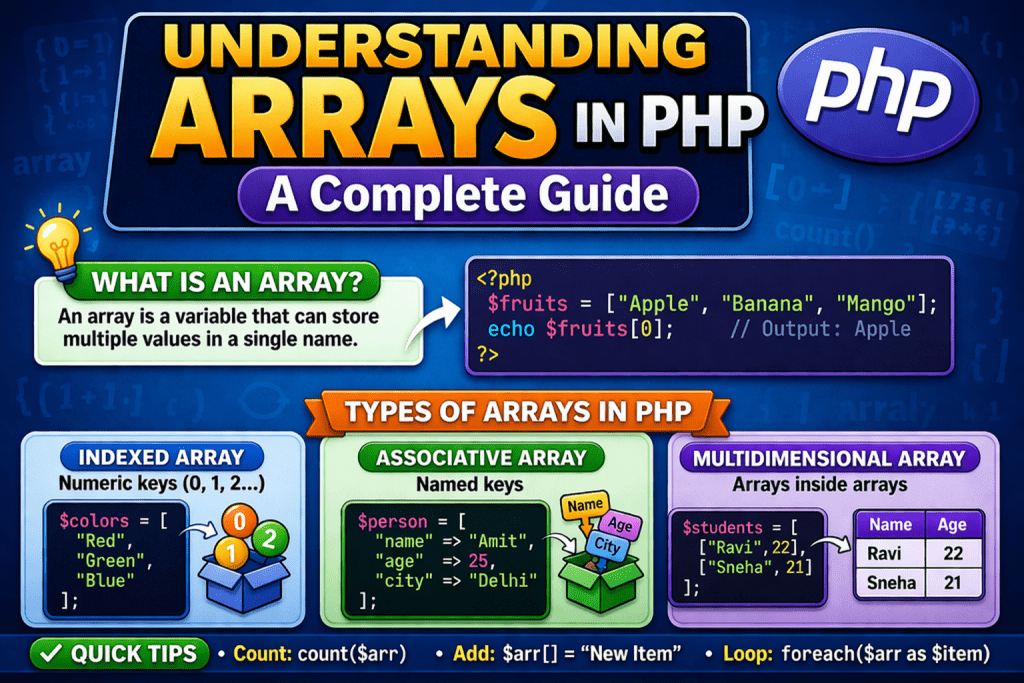
When working with PHP, one of the most essential concepts you’ll encounter is arrays. Arrays allow you to store multiple values in a single variable, making data handling and manipulation much more efficient. In this blog, we’ll dive deep into what arrays are, their types, how to use them, and some best practices.
🔹 What is an Array in PHP?
An array is a data structure that can hold multiple values under a single name. Instead of creating separate variables for each value, arrays let you group related values together.
Example:
$fruit1 = "Apple";
$fruit2 = "Banana";
$fruit3 = "Mango";
Instead of the above, you can use an array:
$fruits = array("Apple", "Banana", "Mango");
Now you can easily access any fruit using its index.
🔹 Types of Arrays in PHP
PHP supports three main types of arrays:
1. Indexed Arrays (Numeric Keys)
- Keys are automatically assigned as numbers (starting from 0).
- Useful for storing ordered lists.
Example:
$colors = array("Red", "Green", "Blue");
echo $colors[0]; // Output: Red
2. Associative Arrays (Named Keys)
- Keys are strings instead of numbers.
- Useful for key-value pairs.
Example:
$person = array(
    "name" => "Himanshu",
    "age" => 28,
    "city" => "Delhi"
);

echo $person["name"]; // Output: Himanshu
3. Multidimensional Arrays
- Arrays containing one or more arrays inside.
- Useful for storing tabular or hierarchical data.
Example:
$employees = array(
    array("John", "Developer", 25000),
    array("Amit", "Designer", 20000),
    array("Sara", "Manager", 40000)
);

echo $employees[1][0]; // Output: Amit
🔹 Creating Arrays in PHP
There are two common ways:
- Using
array()function (traditional)$numbers = array(1, 2, 3, 4); - Using short array syntax
[](modern)$numbers = [1, 2, 3, 4];
🔹 Useful Array Functions in PHP
PHP provides built-in functions for array manipulation:
| Function | Description |
|---|---|
count($arr) | Returns number of elements |
array_push($arr, $val) | Add element at the end |
array_pop($arr) | Remove last element |
array_shift($arr) | Remove first element |
array_unshift($arr, $val) | Add element at the beginning |
array_merge($a1, $a2) | Merge two or more arrays |
in_array($val, $arr) | Check if a value exists |
array_search($val, $arr) | Search for a value and return its key |
array_keys($arr) | Get all keys of array |
array_values($arr) | Get all values of array |
sort($arr) | Sort array ascending |
rsort($arr) | Sort array descending |
asort($arr) | Sort associative array by values |
ksort($arr) | Sort associative array by keys |
🔹 Looping Through Arrays
Using foreach
$fruits = ["Apple", "Banana", "Mango"];

foreach ($fruits as $fruit) {
    echo $fruit . "<br>";
}
Using for
for ($i = 0; $i < count($fruits); $i++) {
    echo $fruits[$i] . "<br>";
}
Looping Associative Arrays
$person = ["name" => "Himanshu", "age" => 28, "city" => "Delhi"];

foreach ($person as $key => $value) {
    echo $key . ": " . $value . "<br>";
}
🔹 Practical Examples
Example 1: Storing Student Marks
$marks = ["Math" => 90, "English" => 85, "Science" => 92];
foreach ($marks as $subject => $score) {
    echo $subject . ": " . $score . "<br>";
}
Example 2: Simple Shopping Cart
$cart = [
    ["item" => "Laptop", "price" => 50000],
    ["item" => "Mobile", "price" => 20000],
    ["item" => "Headphones", "price" => 3000]
];

$total = 0;
foreach ($cart as $product) {
    echo $product["item"] . " - ₹" . $product["price"] . "<br>";
    $total += $product["price"];
}
echo "Total: ₹" . $total;
🔹 Best Practices for Using Arrays
✅ Use descriptive keys in associative arrays (e.g., "name", "price")
✅ Prefer short array syntax [] for cleaner code
✅ Always use count() in loops instead of hardcoding length
✅ For large datasets, consider array functions instead of manual loops
✅ Use multidimensional arrays for structured/tabular data
🔹 Conclusion
Arrays in PHP are incredibly powerful and flexible. They allow developers to store, organize, and manipulate data efficiently. Whether you’re building a simple contact list, a shopping cart, or handling complex datasets, arrays are the backbone of PHP programming.