
Understanding Partitioning in Databases: A Complete Guide
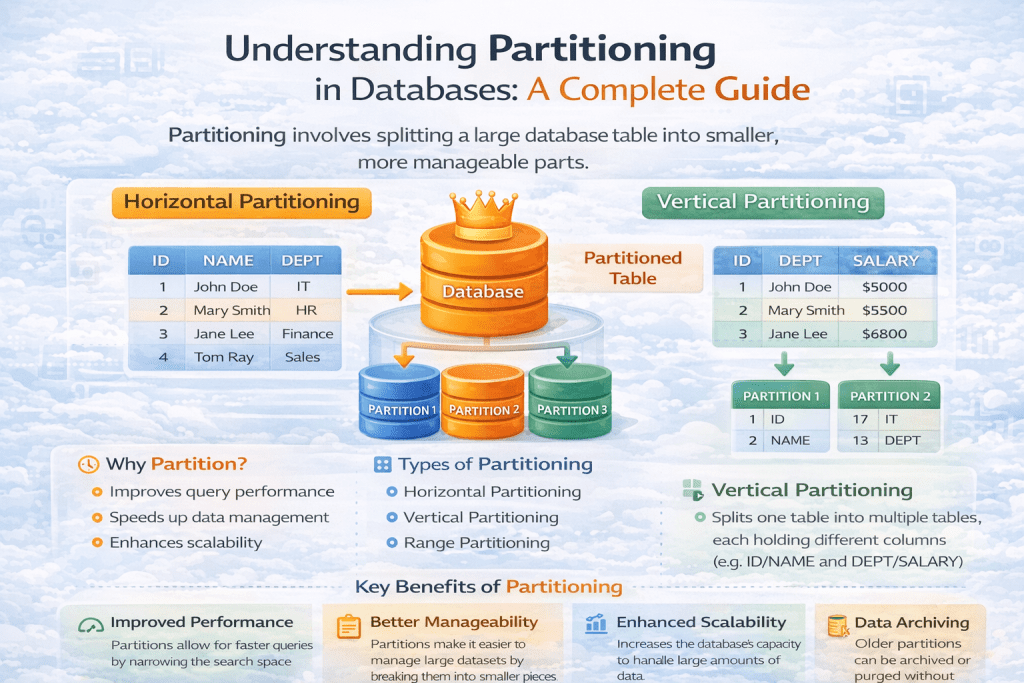
When working with large databases, performance and scalability often become major challenges. As the volume of data grows, queries can slow down, backups become heavy, and maintenance turns complex. One of the most powerful techniques to address these challenges is Partitioning.
In this article, we’ll explore what partitioning is, why it matters, types of partitioning, real-world use cases, and best practices.
🔹 What is Partitioning?
Partitioning is the process of dividing a large table or index into smaller, more manageable pieces (called partitions), while keeping them as part of a single logical table.
Each partition stores a subset of the data, and queries can target specific partitions rather than scanning the entire dataset.
👉 Think of it like a library: Instead of keeping all books in one huge rack, books are divided into smaller racks based on categories like fiction, science, history, etc. This way, finding a book becomes much faster.
🔹 Why Use Partitioning?
Partitioning provides several benefits:
- Performance Optimization – Queries on partitioned data can skip irrelevant partitions and only scan the required ones (known as partition pruning).
- Manageability – Easier to back up, archive, or delete old partitions (e.g., dropping last year’s data).
- Scalability – Allows databases to handle billions of rows efficiently.
- Maintenance – Large indexes and tables can be split, reducing locking and improving concurrency.
- Parallel Processing – Queries can run in parallel across multiple partitions.
🔹 Types of Partitioning
Different databases (MySQL, PostgreSQL, Oracle, etc.) support various partitioning methods. Let’s look at the most common ones:
1. Range Partitioning
Data is distributed based on ranges of values in a column.
- Example: Partitioning a
salestable by year.
CREATE TABLE sales (
   id INT,
   amount DECIMAL(10,2),
   sale_date DATE
)
PARTITION BY RANGE (YEAR(sale_date)) (
   PARTITION p2022 VALUES LESS THAN (2023),
   PARTITION p2023 VALUES LESS THAN (2024),
   PARTITION pmax VALUES LESS THAN MAXVALUE
);
👉 Querying WHERE sale_date BETWEEN '2023-01-01' AND '2023-12-31' will only scan partition p2023.
2. List Partitioning
Data is partitioned based on specific values.
- Example: Partitioning employees by department.
CREATE TABLE employees (
   id INT,
   name VARCHAR(100),
   department VARCHAR(50)
)
PARTITION BY LIST COLUMNS(department) (
   PARTITION pHR VALUES IN ('HR'),
   PARTITION pIT VALUES IN ('IT'),
   PARTITION pSales VALUES IN ('Sales')
);
3. Hash Partitioning
A hashing function is applied to distribute rows evenly across partitions.
- Example: Splitting customer data across 4 partitions.
CREATE TABLE customers (
   id INT,
   name VARCHAR(100)
)
PARTITION BY HASH(id)
PARTITIONS 4;
👉 Ensures uniform distribution, useful when ranges or lists don’t fit well.
4. Key Partitioning
Similar to hash partitioning but based on one or more primary/unique keys.
CREATE TABLE orders (
   order_id INT,
   customer_id INT
)
PARTITION BY KEY(customer_id)
PARTITIONS 6;
5. Composite Partitioning
Combines multiple strategies (e.g., Range + Hash).
- Example: Partition sales by year (range) and then distribute each year by hash (for balancing load).
🔹 Real-World Use Cases
- E-commerce: Partition orders by year/month for faster reporting.
- Banking: Partition transaction history by date range.
- IoT Data: Partition sensor logs by device ID (hash partitioning).
- Telecom: Partition call records by region or operator.
🔹 Advantages of Partitioning
✅ Faster query execution with partition pruning.
✅ Easier maintenance (drop/archive old partitions).
✅ Efficient use of indexes on large datasets.
✅ Improved parallelism in query execution.
🔹 Limitations of Partitioning
⚠️ Not suitable for small tables.
⚠️ Some constraints (like foreign keys in MySQL) are not allowed with partitioned tables.
⚠️ Overhead in query planning if partitions are not chosen wisely.
⚠️ Can increase complexity in schema design.
🔹 Best Practices
- Choose partition keys wisely (date columns are often best).
- Avoid too many partitions (can slow down query optimization).
- Monitor partition sizes to maintain balance.
- Use partition pruning to ensure queries run efficiently.
- Regularly archive or drop old partitions to keep tables optimized.
🔹 Final Thoughts
Partitioning is a powerful tool for handling big data efficiently. It improves query performance, simplifies maintenance, and allows databases to scale. However, it should be used carefully — not all scenarios need partitioning.
If your database tables are growing into millions or billions of rows and query performance is dropping, partitioning might be the right solution.