
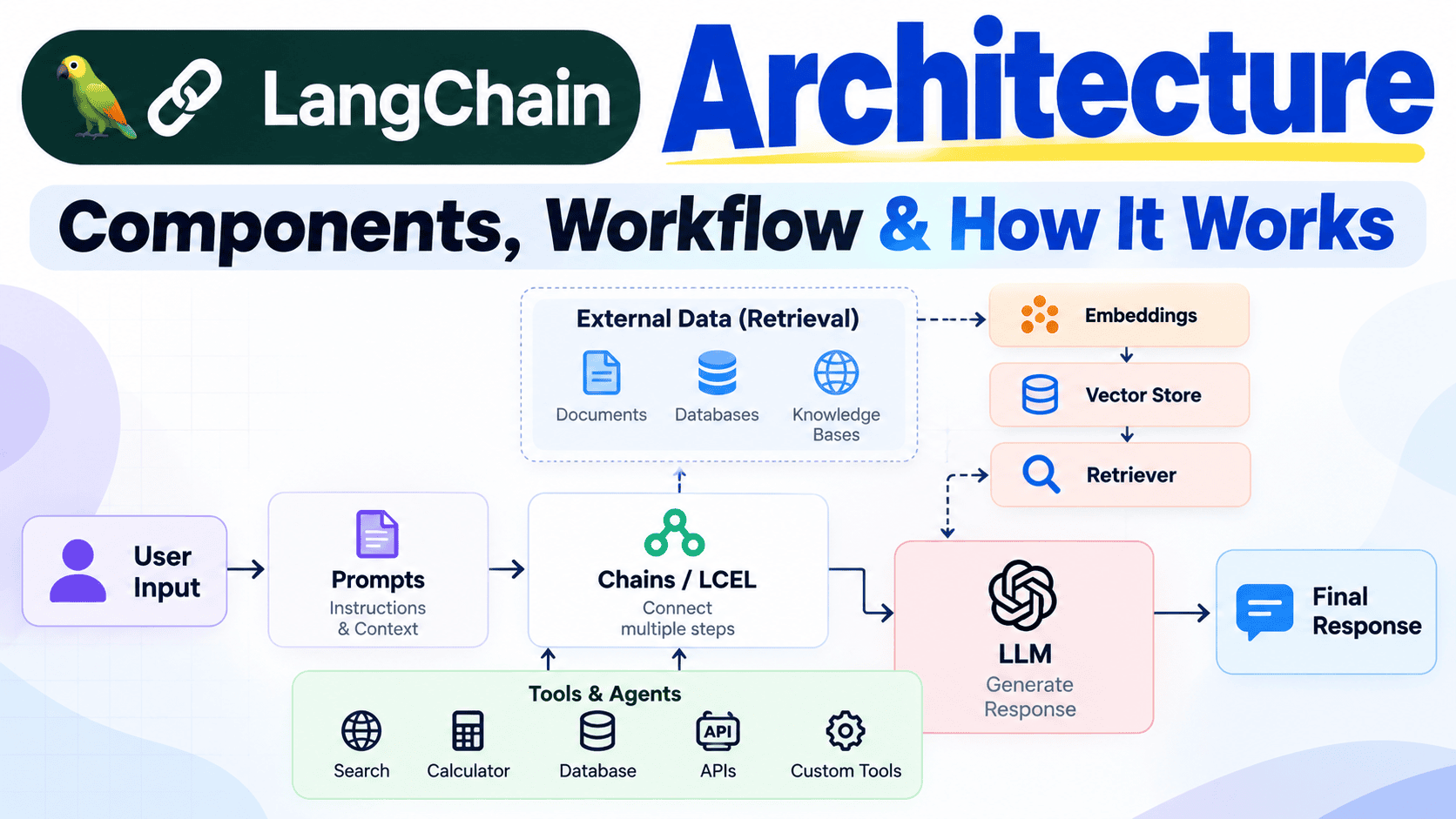
LangChain Architecture: Components, Workflow and How It Works
LangChain architecture is a collection of components that work together to build LLM-powered applications. A typical application can connect user input, prompts, models, retrieval systems, tools, agents, external data, and application logic to produce a final AI response.
Introduction
Building an AI application is more than simply connecting an application to a Large Language Model (LLM).
A basic application might send a user’s question directly to an AI model and return the generated response. But production applications often need to do much more.
They may need to retrieve information from documents, search a knowledge base, access databases, call APIs, use external tools, maintain conversation state, and perform multiple processing steps before generating the final response.
This is where understanding LangChain architecture becomes important.
LangChain provides building blocks that can be combined to create different LLM application workflows.
In this article, we will understand LangChain architecture from the ground up, including its major components, request flow, retrieval workflow, tool calling, agents, RAG architecture, and how everything fits together.
- What is LangChain Architecture?
- LangChain Architecture at a High Level
- Major Components
- Model Layer
- Prompt Layer
- Workflow and LCEL
- Retrieval Layer
- Tools and Tool Calling
- Agent Layer
- RAG Architecture
- Complete Request Workflow
- Database Workflow
- Real-World Architecture Example
- Benefits of This Architecture
- Architecture Limitations
- Architecture Best Practices
- Frequently Asked Questions
- Conclusion
What is LangChain Architecture?
LangChain architecture describes how different components of a LangChain-based application work together.
There is no single architecture that every LangChain application must follow. The architecture depends on the application’s requirements.
A simple application may only require:
A more advanced application may include retrieval, vector search, tools, agents, databases, and multiple model calls.
LangChain Architecture at a High Level
A useful way to understand LangChain architecture is to look at the complete flow of an AI application.
Major Components of LangChain Architecture
A typical LangChain application can contain several layers and components.
Models
Process instructions and generate or transform information.
Prompts
Define the instructions and context given to models.
Chains / LCEL
Connect multiple processing steps into workflows.
Retrievers
Find relevant information from external sources.
Embeddings
Represent information as vectors for semantic search.
Vector Stores
Store and search vector representations.
Tools
Give applications access to external functionality.
Agents
Allow models to decide which tools or actions may be useful.
Output
Convert model results into useful application responses.
Model Layer
The model layer contains the AI model that performs the language generation or reasoning required by the application.
The model may receive:
- User instructions
- System instructions
- Retrieved context
- Conversation information
- Tool results
The model then produces an output that the application can process or return to the user.
Prompt Layer
The prompt layer determines how the model should process the request.
A production application often uses multiple types of instructions rather than simply passing the user’s message directly to the model.
System Instructions
        +
User Question
        +
Retrieved Context
        +
Tool Results
        ↓
Final Prompt
        ↓
LLM
Prompt templates make this structure reusable and easier to maintain.
Workflow Layer and LCEL
The workflow layer connects multiple operations together. This is where concepts such as chains and LCEL become useful.
For example, consider a simple summarization workflow:
Instead of writing every operation as completely separate code, components can be composed into a workflow.
Retrieval Layer
Retrieval becomes important when the AI application needs information from an external knowledge source.
For example, suppose a company has thousands of documents. A user asks:
What is the company's annual leave policy?The application does not need to send every document to the model. Instead, it can search for relevant information.
Where Do Embeddings Fit?
For semantic retrieval, documents can be converted into embeddings and stored in a vector store.
When a user asks a question, the question can also be converted into an embedding. The system can then search for semantically similar content.
Tools and Tool Calling
Tools allow an AI application to interact with external systems or perform actions that are outside the normal capabilities of a language model.
Search Tool
Search an external information source.
Calculator
Perform precise mathematical calculations.
Database Tool
Retrieve structured business information.
API Tool
Communicate with an external service.
A simplified tool-calling workflow looks like this:
Agent Layer
Agents are useful when the application has multiple tools and the model needs to determine which action should be taken.
Consider an AI assistant that has access to:
- Database tool
- Calculator tool
- Search tool
- Email tool
The user asks:
Find last month's sales,
calculate the total,
and email me the result.
The agent can participate in a workflow where the appropriate tools are selected and their results are incorporated into the process.
User Request
     ↓
   Agent
     ↓
 ┌───┼────────────┐
 ↓   ↓            ↓
 DB  Calculator  Email
 ↓   ↓            ↓
 └───┼────────────┘
     ↓
Final Response
RAG Architecture in LangChain
Retrieval-Augmented Generation, or RAG, is one of the most common architectures used with LLM applications.
A RAG system generally has two major stages:
1. Indexing
Documents are loaded, split into chunks, converted into embeddings, and stored for retrieval.
2. Retrieval
A user question is used to find relevant information before the final response is generated.
RAG Indexing Workflow
RAG Query Workflow
Complete LangChain Request Workflow
Now let’s combine the major components and look at what can happen when a user sends a question to a LangChain application.
LangChain Database Workflow
Another important architecture is connecting an AI application with structured databases.
Consider a business application where data is stored in a relational database.
The user might ask:
How many orders did we receive last month?A possible workflow is:
Production systems should use appropriate permissions, validation, access control, query restrictions, and preferably read-only access where the AI only needs to retrieve information.
Real-World LangChain Architecture Example
Imagine a company wants to build an internal AI assistant that can answer questions using company documents and business data.
The application might contain:
User Interface
Web or mobile interface where employees ask questions.
Application Backend
Handles authentication, business rules, and requests.
LangChain Workflow
Coordinates prompts, retrieval, models, and tools.
Knowledge Base
Stores company documents and searchable information.
Database
Provides access to structured business information.
LLM
Generates the final natural-language response.
                 ┌─────────────────┐
                 │      User       │
                 └────────┬────────┘
                          ↓
                 ┌─────────────────┐
                 │   Application   │
                 │     Backend     │
                 └────────┬────────┘
                          ↓
                 ┌─────────────────┐
                 │    LangChain    │
                 │    Workflow     │
                 └───────┬─┬───────┘
                         │ │
              ┌──────────┘ └──────────┐
              ↓                       ↓
       ┌──────────────┐        ┌──────────────┐
       │ Knowledge    │        │   Database   │
       │    Base      │        │    Tools     │
       └──────┬───────┘        └──────┬───────┘
              │                       │
              └───────────┬───────────┘
                          ↓
                   ┌─────────────┐
                   │     LLM     │
                   └──────┬──────┘
                          ↓
                   Final Response
Why Is Good Architecture Important?
A well-designed AI architecture makes an application easier to maintain, debug, secure, and scale.
Separation of Responsibilities
Prompts, retrieval, tools, business logic, and model interactions can be kept logically separated.
Easier Debugging
Individual steps can be tested separately instead of debugging the entire application at once.
Better Maintainability
Individual components can be changed without rewriting the entire application.
Scalability
A modular design makes it easier to expand an application with new tools and data sources.
LangChain Architecture Limitations
LangChain can simplify application development, but it does not remove the need for good software architecture.
Complexity
Large agentic applications can become difficult to understand if workflows are not designed carefully.
Latency
Multiple model calls, retrieval operations, and tool calls can increase response time.
Cost
More model calls and larger prompts can increase infrastructure and model usage costs.
Reliability
External APIs, databases, retrieval systems, and models can all introduce failure points.
LangChain Architecture Best Practices
When building production AI applications, a few principles can make the architecture more reliable.
- Keep business logic separate from AI orchestration.
- Keep prompts reusable and versioned.
- Use retrieval only when external knowledge is required.
- Validate tool inputs and outputs.
- Give database tools only the permissions they need.
- Avoid unnecessary LLM calls.
- Monitor latency, failures, and token usage.
- Test retrieval quality separately from generation quality.
- Add proper authentication and authorization.
- Log important workflow steps for debugging.
Simple vs Advanced LangChain Architecture
| Simple Application | Advanced Application |
|---|---|
| User Input | User Input |
| Prompt | Router / Agent |
| LLM | Retrieval + Tools |
| Response | Multiple Model Calls |
| — | Database / APIs |
| — | Final Response |
Key Takeaway
The LLM is responsible for language generation and reasoning, while the surrounding application provides data, tools, retrieval, business logic, and workflow control.
Frequently Asked Questions
What is LangChain architecture?
LangChain architecture describes how models, prompts, workflows, retrieval systems, tools, agents, external data, and application logic can work together to build an AI application.
What is the main component of LangChain?
There is no single component that defines every LangChain application. Common building blocks include models, prompts, LCEL workflows, tools, retrievers, embeddings, vector stores, and agents.
How does a LangChain application work?
A typical application receives user input, processes it through one or more workflows, optionally retrieves information or calls tools, sends the appropriate context to an LLM, and returns the resulting response.
Where does RAG fit into LangChain architecture?
RAG is an application architecture that can use retrieval components, embeddings, vector stores, prompts, and an LLM to answer questions using external information.
Are agents required in every LangChain application?
No. Simple applications do not need agents. Agents are useful when a model needs to select among multiple tools or actions as part of a workflow.
Can LangChain connect to databases?
Yes. LangChain applications can use database-related tools and workflows to retrieve structured information. Production systems should apply appropriate security and access controls.
Does LangChain replace an LLM?
No. LangChain is a framework used to build applications around language models. It does not replace the model itself.
Is LangChain architecture the same for every project?
No. Architecture depends on the application’s requirements. A simple chatbot may need only a model and prompt, while a complex enterprise assistant may require retrieval, databases, tools, agents, and multiple workflows.
Conclusion
Understanding LangChain architecture is important if you want to build more than a basic prompt-and-response AI application.
LangChain allows developers to organize different parts of an AI system into reusable workflows. These parts can include models, prompts, retrieval systems, embeddings, vector stores, tools, agents, databases, and external APIs.
A simple application might follow:
A more advanced application can look like:
The key idea is that LangChain is not the AI model itself. Instead, it provides a way to organize and connect the components around an AI model.
LLM = Intelligence
LangChain = Orchestration and application building blocks
RAG = External knowledge retrieval + generation
Tools = External capabilities
Agents = Model-driven tool selection and workflows
Once you understand this architecture, concepts such as RAG, agents, tool calling, vector databases, LangGraph, and MCP become much easier to understand.
LangChain Components Explained: Models, Prompts, Chains, Tools & Agents
Learn each major LangChain component in detail and understand when and why to use it in real AI projects.