
Laravel Authentication Types Explained | Sanctum vs Passport vs Breeze
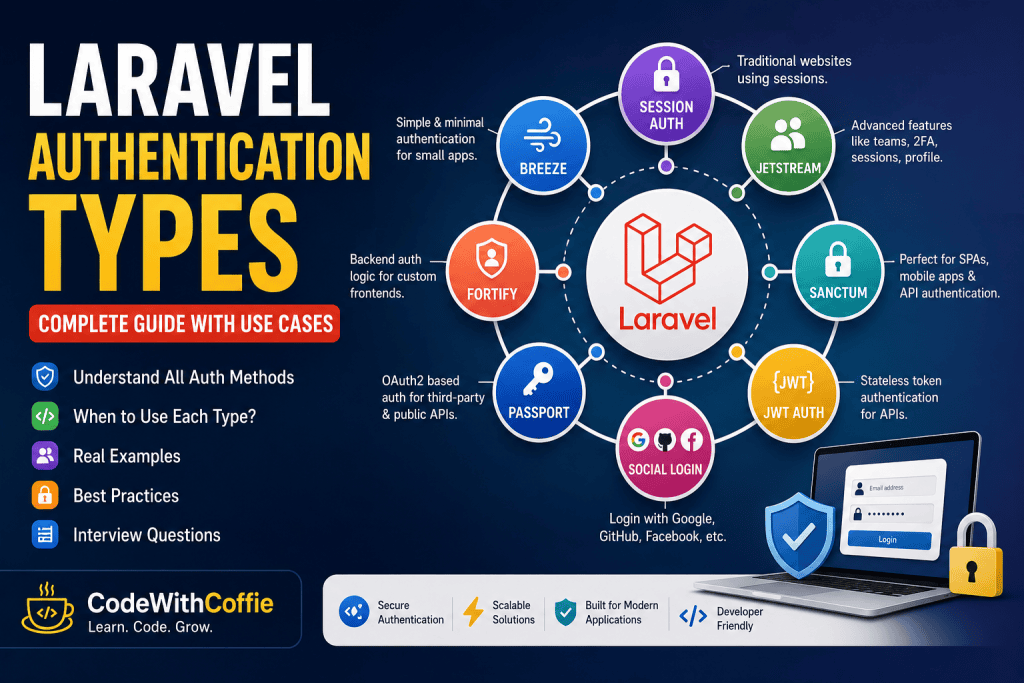
Authentication is one of the most important concepts in Laravel development. Whether you’re building a simple blog, an admin panel, a REST API, or a SaaS platform, choosing the right authentication method is essential for security and performance.
Laravel provides multiple authentication solutions, each designed for different use cases. Beginners often get confused about which one to choose—Session Authentication, Breeze, Jetstream, Sanctum, Passport, or JWT.
In this guide, you’ll learn what each authentication type is, how it works, when to use it, and which option is best for your project.
What is Authentication?
Authentication is the process of verifying a user’s identity before allowing access to protected resources.
For example, when you log in to Facebook, Gmail, or an admin dashboard, the application checks whether your email and password are correct. If they are valid, the user is authenticated and granted access.
Simply put,
Authentication answers the question: “Who are you?”
Authentication vs Authorization
Many developers confuse these two concepts.
| Authentication | Authorization |
|---|---|
| Verifies the user’s identity | Checks what the user is allowed to access |
| Happens first | Happens after authentication |
| Login process | Permission checking |
| Uses email/password, tokens, or sessions | Uses roles and permissions |
Example:
- Login using email and password → Authentication ✅
- Only Admin can delete users → Authorization ✅
How Authentication Works in Laravel
The authentication flow is straightforward:
User
   │
   ▼
Login Form
   │
   ▼
Laravel Auth
   │
   ▼
Credentials Verified
   │
   ▼
Session or Token Created
   │
   ▼
Access Protected Routes
Laravel handles most of this process automatically using guards, providers, middleware, and sessions or tokens.
Types of Authentication in Laravel
Laravel offers several authentication methods. Each is suitable for different project types.
1. Session Authentication
Session Authentication is Laravel’s default authentication method.
After a successful login, Laravel stores the user’s information in a server-side session. Every request checks whether the session is still valid.
Best For
- Company Websites
- Admin Panels
- CRM
- ERP
- School Management Systems
- E-commerce Admin
Example
Route::middleware('auth')->group(function () {
    Route::get('/dashboard', function () {
        return view('dashboard');
    });
});
Advantages
- Easy to implement
- Highly secure
- Built into Laravel
- No extra packages required
Limitations
- Not suitable for REST APIs
- Requires server-side sessions
2. Laravel Breeze
Laravel Breeze is Laravel’s simplest authentication starter kit.
It includes:
- Login
- Registration
- Forgot Password
- Reset Password
- Email Verification
- Basic Dashboard
Install it using:
composer require laravel/breeze --dev

php artisan breeze:install

php artisan migrate

npm install && npm run build
Best For
- Beginners
- Small Applications
- Admin Panels
- Portfolio Projects
Advantages
- Lightweight
- Easy to customize
- Official Laravel package
3. Laravel Jetstream
Jetstream is an advanced authentication starter kit.
It includes everything Breeze provides, plus:
- Two-Factor Authentication (2FA)
- Team Management
- Browser Session Management
- Profile Management
- API Token Support (via Sanctum)
Best For
- SaaS Applications
- Team Collaboration Platforms
- Subscription-Based Products
Example
Imagine you’re building a project management application where users can create teams and invite members. Jetstream already provides these features, saving development time.
Advantages
- Feature-rich
- Built by the Laravel team
- Supports Livewire and Inertia.js
4. Laravel Fortify
Laravel Fortify provides backend authentication logic without any frontend UI.
It handles:
- Login
- Registration
- Password Reset
- Email Verification
- Two-Factor Authentication
You build the frontend yourself using React, Vue, Angular, or any other framework.
Best For
- Custom Frontend Applications
- React Projects
- Vue Projects
- Mobile Backends
Example
If you’re building a React application with a Laravel API backend, Fortify manages authentication while React handles the user interface.
5. Laravel Sanctum
Sanctum is Laravel’s recommended solution for API authentication and Single Page Applications (SPAs).
Instead of using sessions, Sanctum issues API tokens.
Authentication flow:
User Login
      │
      ▼
Token Generated
      │
      ▼
Client Stores Token
      │
      ▼
API Request
      │
Authorization: Bearer Token
      │
      ▼
Access Granted
Best For
- React + Laravel
- Vue + Laravel
- Next.js + Laravel
- Flutter Apps
- Mobile Applications
- Internal APIs
Example
$token = $user->createToken('mobile-app')->plainTextToken;Advantages
- Lightweight
- Official Laravel package
- Easy to implement
- Secure token authentication
6. Laravel Passport
Passport is Laravel’s OAuth2 authentication package.
It is designed for applications where third-party clients need secure access.
Best For
- Public APIs
- Third-party Integrations
- Enterprise Applications
- OAuth2 Authentication
Example
Suppose you’re creating an API that other companies or developers will use. Passport allows external applications to securely access your API using OAuth2.
Advantages
- Full OAuth2 support
- Refresh Tokens
- Access Tokens
- Client Credentials
- Authorization Code Flow
Limitation
Passport is more complex than Sanctum and should only be used when OAuth2 features are required.
7. JWT Authentication
JWT (JSON Web Token) is a stateless authentication method commonly used in REST APIs.
A JWT contains three parts:
Header
.
Payload
.
Signature
Example:
eyJhbGciOiJIUzI1NiIsInR5cCI6IkpXVCJ9...Best For
- REST APIs
- Mobile Apps
- Microservices
Advantages
- Stateless
- Fast
- Easy to scale
Limitation
Laravel does not include JWT support by default. You’ll typically use a package like php-open-source-saver/jwt-auth.
Which Authentication Should You Choose?
| Project Type | Recommended Authentication |
|---|---|
| Blog | Session Authentication |
| Company Website | Breeze |
| Admin Panel | Breeze |
| CRM / ERP | Session Authentication |
| React + Laravel | Sanctum |
| Vue + Laravel | Sanctum |
| Flutter App | Sanctum |
| Mobile App | Sanctum |
| Public API | Passport |
| Third-party Integration | Passport |
| SaaS Product | Jetstream |
| Microservices | JWT |
Interview Questions
- What is authentication in Laravel?
- What is the difference between authentication and authorization?
- What are Guards in Laravel?
- What are Providers in Laravel?
- What is Laravel Breeze?
- What is Laravel Sanctum?
- What is Laravel Passport?
- Sanctum vs Passport — what is the difference?
- When should you use JWT?
- Which authentication method is best for React or Flutter applications?
Conclusion
Laravel provides multiple authentication solutions, and each serves a different purpose. Session Authentication is ideal for traditional web applications, Breeze is perfect for beginners and small projects, Jetstream adds advanced features for SaaS applications, Fortify is useful when building a custom frontend, Sanctum is the recommended choice for first-party APIs and mobile applications, Passport is the best option for OAuth2 and third-party integrations, while JWT is a great fit for stateless REST APIs and microservices.
The key to choosing the right authentication method is understanding your project’s architecture and requirements. By selecting the appropriate solution, you can build secure, scalable, and maintainable Laravel applications with confidence.