
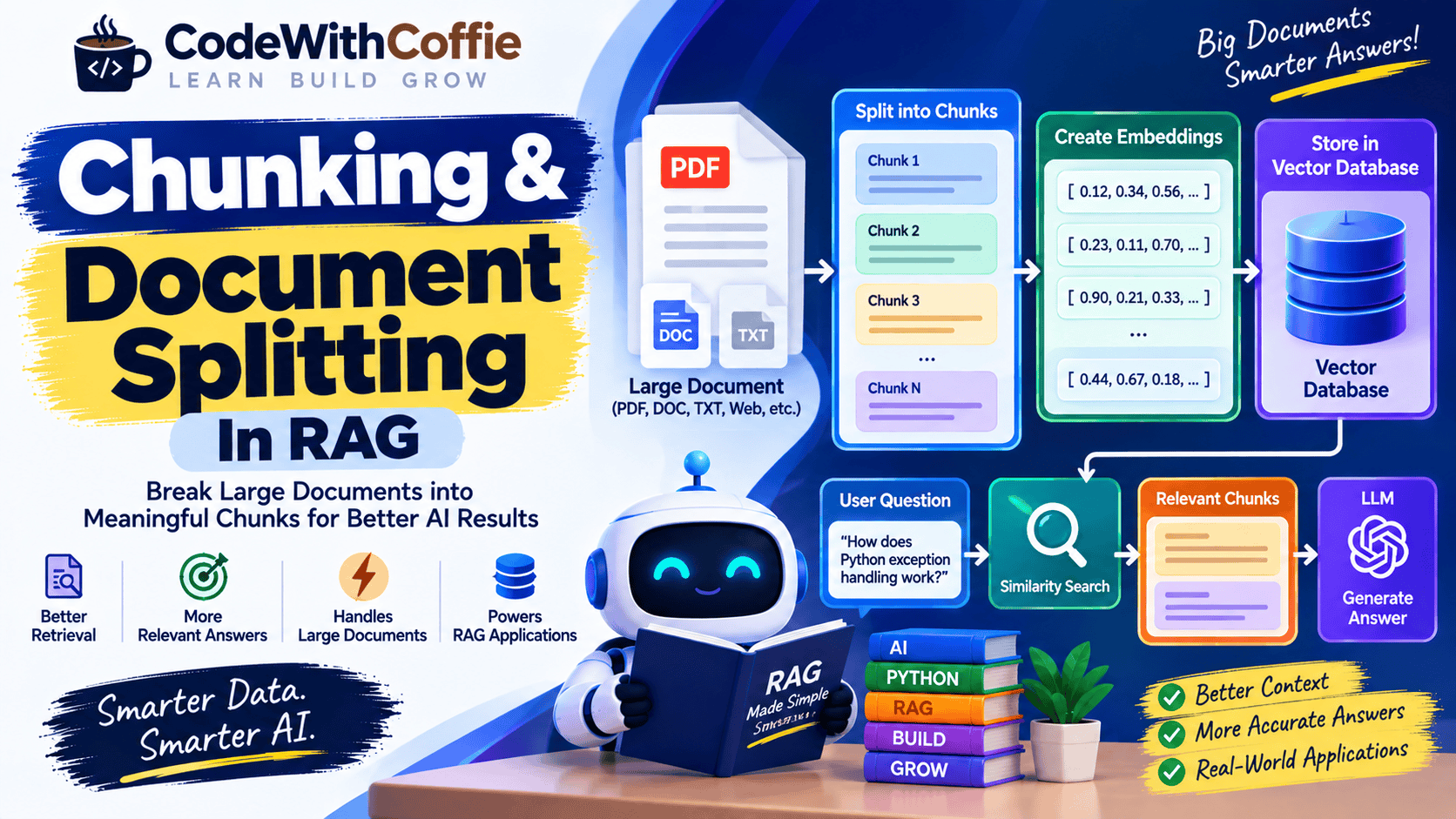
Chunking & Document Splitting in RAG: Complete Guide
When building a RAG (Retrieval-Augmented Generation) application, one of the most important steps is deciding how to split your documents before creating embeddings.
Large documents are usually not sent directly to an embedding model or an LLM. Instead, they are divided into smaller sections called chunks.
This process is known as document chunking or document splitting.
In simple words:
Chunking is the process of breaking a large document into smaller, meaningful pieces so that relevant information can be efficiently retrieved by an AI system.
Chunking may look like a simple preprocessing step, but it can have a major impact on the quality of a RAG application.
In this article, you will learn:
- What document chunking is
- Why chunking is needed in RAG
- How document splitting works
- Different chunking strategies
- Fixed-size chunking
- Character-based chunking
- Token-based chunking
- Sentence-based chunking
- Recursive character splitting
- Semantic chunking
- Chunk overlap
- How chunk size affects RAG
- Common chunking mistakes
- Best practices
- A practical RAG chunking workflow
What is Chunking?
Chunking means dividing a large document into smaller pieces that can be processed and retrieved independently.
Suppose you have a 100-page PDF containing:
Python Basics
Python Functions
Python Classes
Python APIs
Python File Handling
Python ExceptionsInstead of treating the entire PDF as one piece of information, you can split it into smaller chunks:
Document
   ↓
Chunk 1
Chunk 2
Chunk 3
Chunk 4
Chunk 5
...Each chunk can then be converted into an embedding and stored in a Vector Database.
Why is Chunking Needed in RAG?
Chunking is important because large documents can contain a huge amount of information.
Suppose a user asks:
How does Python exception handling work?Your document may contain 100 pages.
You don’t want to send all 100 pages to the LLM.
Instead, the RAG system should retrieve only the relevant section:
Python Documentation
       ↓
Chunking
       ↓
Exception Handling Chunk
       ↓
Embedding
       ↓
Vector Database
       ↓
User Question
       ↓
Relevant Chunk
       ↓
LLM
       ↓
AnswerThis makes retrieval more focused.
Chunking in the RAG Pipeline
Chunking is part of the document ingestion process.
A typical RAG pipeline looks like this:
Documents
    ↓
Document Loading
    ↓
Text Extraction
    ↓
Document Splitting
    ↓
Chunks
    ↓
Embeddings
    ↓
Vector Database
    ↓
User Query
    ↓
Retrieval
    ↓
LLM
    ↓
AnswerSo chunking happens before embeddings and retrieval.
What is a Document Chunk?
A document chunk is a smaller section of a larger document.
For example:
Original Document:

Python is a high-level programming language.
It supports functions, classes, modules,
exception handling, file processing, and APIs.After splitting:
Chunk 1:
Python is a high-level programming language.

Chunk 2:
It supports functions, classes, modules,
exception handling, file processing, and APIs.Each chunk can have its own embedding.
Chunking Example
Suppose you have this document:
Python is a programming language.

Python supports functions.

Python supports object-oriented programming.

Python can be used to build APIs.

Python is widely used in artificial intelligence.You could split it into:
Chunk 1:
Python is a programming language.

Chunk 2:
Python supports functions.

Chunk 3:
Python supports object-oriented programming.

Chunk 4:
Python can be used to build APIs.

Chunk 5:
Python is widely used in artificial intelligence.Each chunk can then be embedded separately.
Chunking and Embeddings
Chunking and embeddings are closely connected.
The process looks like this:
Large Document
      ↓
Chunking
      ↓
Small Chunks
      ↓
Embedding Model
      ↓
Vectors
      ↓
Vector DatabaseFor example:
Chunk:
Python can be used to build REST APIs.↓
Embedding Model↓
[0.21, 0.73, 0.18, 0.52, ...]The vector is then stored in the Vector Database.
What Happens If You Don’t Chunk Documents?
Suppose you have a very large document and create only one embedding for the entire document.
The embedding represents the document at a broad level.
Now imagine the user asks:
How does authentication work?The system may know that the document is generally about software development, but it may not retrieve the exact section about authentication effectively.
Chunking allows different parts of the document to have their own embeddings.
Large Document
      ↓
Authentication Chunk
API Chunk
Database Chunk
Security Chunk
Deployment ChunkThis makes targeted retrieval possible.
What is Chunk Size?
Chunk size refers to how much content is included in each chunk.
For example:
Chunk Size = 500 tokensmeans each chunk contains approximately 500 tokens.
Or:
Chunk Size = 1,000 charactersmeans each chunk contains approximately 1,000 characters.
The ideal chunk size depends on the document type and retrieval task.
There is no universal chunk size that works perfectly for every RAG application.
Small Chunks vs Large Chunks
Chunk size creates a trade-off.
Small Chunks
Example:
100–200 tokensAdvantages:
- More focused retrieval
- Less irrelevant information
- Easier to retrieve specific facts
Disadvantages:
- Important context may be missing
- More chunks are created
- Related information may be separated
Large Chunks
Example:
1,000–2,000 tokensAdvantages:
- More context
- Related information stays together
- Better for some complex explanations
Disadvantages:
- More irrelevant information may be retrieved
- More tokens may be sent to the LLM
- Retrieval can become less precise
The goal is to find a useful balance between precision and context.
What is Chunk Overlap?
Chunk overlap means allowing consecutive chunks to share some content.
For example, suppose you have:
Chunk Size = 500 tokens
Overlap = 100 tokensThen the chunks might look conceptually like:
Chunk 1:
Tokens 1 → 500

Chunk 2:
Tokens 401 → 900

Chunk 3:
Tokens 801 → 1300The 100-token overlap helps preserve context between chunks.
Why is Chunk Overlap Useful?
Imagine a sentence or explanation starts near the end of one chunk and continues into the next chunk.
Without overlap:
Chunk 1:
The authentication process starts by validating

Chunk 2:
the user's access token...
The meaning can become fragmented.
With overlap:
Chunk 1:
The authentication process starts by validating
the user's access token...

Chunk 2:
validating the user's access token and checking
its expiration...The repeated context can help retrieval preserve continuity.
How Much Chunk Overlap Should You Use?
There is no universal number.
Common approaches might use a modest overlap such as:
10%–20%of the chunk size, but the appropriate value depends on the content and retrieval task.
For example:
Chunk Size:
500 tokens

Overlap:
50–100 tokenscan be a reasonable starting point for experimentation.
Always evaluate the results using your actual documents and queries.
Different Document Chunking Strategies
There are several ways to split documents.
Common strategies include:
- Fixed-size chunking
- Character-based chunking
- Token-based chunking
- Sentence-based chunking
- Recursive character splitting
- Paragraph-based chunking
- Markdown-aware chunking
- HTML-aware chunking
- Semantic chunking
Let’s understand them one by one.
1. Fixed-Size Chunking
Fixed-size chunking divides the document into pieces of a predefined size.
For example:
Chunk Size = 500 charactersThe document becomes:
Chunk 1 → 0–500
Chunk 2 → 500–1000
Chunk 3 → 1000–1500Advantages
- Very simple
- Easy to implement
- Predictable chunk sizes
Disadvantages
- Can split sentences
- Can split paragraphs
- May break important context
Fixed-size chunking is useful for simple experiments but may not always be ideal for production RAG systems.
2. Character-Based Chunking
Character-based splitting divides content according to character count.
For example:
Chunk Size = 1,000 charactersThe document is split every 1,000 characters.
Example:
Document
 ↓
1,000 characters
 ↓
1,000 characters
 ↓
1,000 charactersThis approach is easy but does not necessarily understand the structure or meaning of the document.
3. Token-Based Chunking
Token-based chunking splits text based on tokens rather than characters.
For example:
Chunk Size = 500 tokensThis can be useful because LLMs process text in tokens.
Conceptually:
Text
 ↓
Tokenizer
 ↓
Tokens
 ↓
Chunk every N tokensToken-based chunking provides more predictable control over the amount of text sent through model APIs.
What is a Token?
A token is a unit of text processed by language models.
A token may represent:
- A complete word
- Part of a word
- Punctuation
- Other pieces of text
For example, a sentence may be broken into multiple tokens.
The exact tokenization depends on the tokenizer and language.
4. Sentence-Based Chunking
Sentence-based chunking splits documents according to sentence boundaries.
For example:
Sentence 1.
Sentence 2.
Sentence 3.
Sentence 4.can become:
Chunk 1:
Sentence 1.
Sentence 2.

Chunk 2:
Sentence 3.
Sentence 4.This helps avoid cutting sentences in the middle.
5. Paragraph-Based Chunking
Paragraph-based chunking uses paragraph boundaries.
For example:
Paragraph 1

Paragraph 2

Paragraph 3

Paragraph 4can become:
Chunk 1:
Paragraph 1
Paragraph 2

Chunk 2:
Paragraph 3
Paragraph 4This can work well for documents where paragraphs represent meaningful units of information.
6. Recursive Character Splitting
Recursive character splitting is a popular strategy in RAG frameworks.
Instead of blindly cutting text at one fixed character count, the splitter tries multiple separators.
For example:
Paragraph
    ↓
Sentence
    ↓
Word
    ↓
CharacterConceptually:
Large Text
   ↓
Split by paragraphs
   ↓
If still too large
   ↓
Split by sentences
   ↓
If still too large
   ↓
Split by wordsThis approach tries to preserve the natural structure of the document while keeping chunks within the desired size.
Example of Recursive Splitting
Suppose your document is:
Python is a programming language.

It is widely used for web development,
automation, data analysis, and AI.

Python supports object-oriented programming.A recursive splitter might first try paragraph boundaries.
If a paragraph is still too large, it can split it further using sentence or other separators.
The result can preserve more meaningful context than simple fixed-size splitting.
7. Markdown-Aware Chunking
If your documentation is written in Markdown, you can use its structure.
For example:
# Python

## Functions

Functions allow you to organize reusable code.

## Classes

Classes are used for object-oriented programming.Instead of treating the entire document as plain text, you can preserve the heading structure.
For example:
Chunk:
Heading: Python
Section: Functions
Content: Functions allow you to organize reusable code.This can improve retrieval quality because the chunk retains useful context.
8. HTML-Aware Chunking
Web pages often contain:
<h1>Python Tutorial</h1>

<h2>Functions</h2>

<p>Functions allow reusable code...</p>An HTML-aware splitter can use the document structure to create meaningful chunks.
For example:
Page
 ↓
Heading
 ↓
Section
 ↓
ParagraphThis is often better than simply splitting the raw HTML string every N characters.
9. Semantic Chunking
Semantic chunking attempts to divide a document based on meaning rather than only character or token counts.
For example, consider:
Python is a programming language.

Functions allow developers to create reusable blocks of code.

Classes provide a structure for object-oriented programming.

Python can also be used to build APIs.A semantic splitter attempts to keep related ideas together.
Conceptually:
Programming Introduction
        ↓
Chunk 1

Functions
        ↓
Chunk 2

Object-Oriented Programming
        ↓
Chunk 3

API Development
        ↓
Chunk 4Semantic chunking can be more sophisticated, but it may require additional processing and evaluation.
Structure-Aware Chunking
For structured documents, the document’s organization can be more important than a fixed chunk size.
For example:
Book
 ├── Chapter 1
 │    ├── Section 1
 │    └── Section 2
 │
 ├── Chapter 2
 │    ├── Section 1
│ └── Section 2A good chunking strategy can preserve:
- Chapter
- Section
- Heading
- Paragraph
- List
- Table
- Metadata
This can make retrieved chunks easier for an LLM to understand.
Chunking Tables
Tables can be especially difficult.
Consider:
| Product | Price | Stock |
|---|---|---|
| Laptop | ₹50,000 | 10 |
| Monitor | ₹15,000 | 20 |
Simply converting this table into plain text may lose relationships between headers and values.
A better approach is to preserve the table structure where possible.
For example:
Product: Laptop
Price: ₹50,000
Stock: 10This can make the information easier to retrieve.
Chunking PDFs
PDFs require special attention because their internal structure may not match their visual layout.
A PDF can contain:
- Text
- Headings
- Tables
- Images
- Footnotes
- Headers
- Page numbers
- Multiple columns
A good PDF pipeline may look like:
PDF
 ↓
PDF Parser
 ↓
Text + Structure
 ↓
Clean Content
 ↓
Chunking
 ↓
EmbeddingsSimply extracting raw text and splitting it blindly can produce poor chunks.
Chunking Code Documentation
Code should generally not be chunked exactly like normal prose.
Suppose you have:
def calculate_total(price, quantity):
return price * quantitySplitting the function in the middle would make the retrieved code incomplete.
For code documentation, try to preserve meaningful units such as:
- Functions
- Classes
- Methods
- Modules
- Code blocks
- Documentation comments
For example:
Function:
calculate_total()

Description:
Calculates total price based on price and quantity.

Code:
...Chunking FAQs
FAQs are usually naturally structured.
For example:
Question:
How do I reset my password?

Answer:
Click "Forgot Password" and follow the instructions.It can be useful to keep each question and answer together.
Bad chunk:
Question in Chunk 1
Answer in Chunk 2Better:
Chunk:
Question + AnswerThis preserves the relationship between the question and its answer.
Chunking Product Documentation
Product documentation may contain:
Installation
Configuration
Authentication
API Reference
Troubleshooting
ExamplesEach section can become a meaningful retrieval unit.
For example:
Product Documentation
       ↓
Authentication
       ↓
API Keys
       ↓
Token Authentication
       ↓
Error HandlingThis structure can help the retrieval system return more relevant context.
How Chunk Size Affects Retrieval
Imagine a user asks:
How do I configure API authentication?Very Small Chunks
You might retrieve:
"API authentication uses tokens..."but miss the configuration instructions.
Very Large Chunks
You might retrieve:
Authentication
+
API Reference
+
Error Handling
+
Examples
+
DeploymentNow the LLM receives lots of irrelevant information.
Balanced Chunks
A useful chunk might contain:
API Authentication

API keys are generated from the developer dashboard.

Add the API key to the Authorization header...This provides both the relevant information and enough context.
Chunking and Retrieval Quality
A RAG system can be represented as:
Good Documents
      ↓
Good Chunking
      ↓
Good Embeddings
      ↓
Good Retrieval
      ↓
Good Context
      ↓
Better AnswerIf chunking is poor:
Poor Chunking
      ↓
Poor Retrieval
      ↓
Poor Context
      ↓
Poor AnswerThis is why chunking deserves careful attention.
Common Chunking Mistakes
Mistake 1: Using One Chunk Size for Everything
A 500-token chunk may work for one document type but not another.
For example:
FAQ
Technical Documentation
Legal Document
Research Paper
Codemay all require different strategies.
Mistake 2: Ignoring Document Structure
Splitting at arbitrary positions can destroy headings and relationships.
Mistake 3: No Overlap When Context Requires It
Important information may be split between chunks.
Mistake 4: Excessive Overlap
Too much overlap creates duplicate information and increases storage and retrieval volume.
Mistake 5: Chunks That Are Too Large
Large chunks can introduce irrelevant context.
Mistake 6: Chunks That Are Too Small
Tiny chunks may lose the context needed to understand the information.
Mistake 7: Ignoring Metadata
A chunk should often retain useful metadata such as:
Document
Page
Section
Heading
Category
URL
Author
DateBest Practices for Document Chunking
1. Preserve Meaning
Try to keep related information together.
2. Respect Document Structure
Use:
- Headings
- Paragraphs
- Sections
- Lists
- Tables
- Code blocks
when possible.
3. Start with a Reasonable Chunk Size
There is no universal value.
Start with a reasonable range and test it against real queries.
4. Use Chunk Overlap Carefully
Overlap can help preserve context but too much overlap can increase duplication.
5. Store Metadata
Metadata can help with filtering and source attribution.
6. Evaluate Retrieval
Don’t judge chunking only by how the chunks look.
Test actual user questions.
For example:
Question
   ↓
Retrieve Top 5 Chunks
   ↓
Are the correct chunks present?Measure retrieval quality before optimizing generation.
7. Use Different Strategies for Different Data
For example:
PDF → Structure-aware chunking
FAQ → Question-answer chunks
Code → Function/class chunks
Markdown → Heading-aware chunks
Web pages → HTML-aware chunksChunking in a Production RAG System
A production system may look like:
                DATA SOURCES
                     ↓
              Document Loaders
                     ↓
              Content Cleaning
                     ↓
              Structure Detection
                     ↓
                 Chunking
                     ↓
                Metadata
                     ↓
              Embedding Model
                     ↓
              Vector Database
                     ↓
                Retrieval
                     ↓
                 Reranking
                     ↓
                  Context
                     ↓
                    LLM
                     ↓
               Final Answer
Chunking is only one part of the complete retrieval pipeline, but it can strongly influence downstream performance.
Chunking with Python
A simple conceptual Python implementation could look like:
text = """
Python is a programming language.
Python supports functions and classes.
Python is widely used in AI development.
"""

chunk_size = 50

chunks = [
    text[i:i + chunk_size]
    for i in range(0, len(text), chunk_size)
]

for chunk in chunks:
print(chunk)This is a basic fixed-size approach.
In real RAG applications, you would generally use more sophisticated document splitting logic that respects sentence, paragraph, heading, or token boundaries.
Chunking with a RAG Framework
Frameworks such as LangChain and LlamaIndex provide document splitting utilities that can help developers implement different chunking strategies.
A conceptual pipeline is:
Document Loader
      ↓
Text Splitter
      ↓
Chunks
      ↓
Embedding Model
      ↓
Vector StoreThe exact implementation depends on the framework and the type of documents you are processing.
How to Choose the Right Chunking Strategy
Ask these questions:
1. What type of data do I have?
PDF?
Website?
Markdown?
FAQ?
Code?
Research paper?2. Does the document have a clear structure?
If yes, use that structure.
3. Do users ask specific questions?
If yes, smaller and focused chunks may work well.
4. Do answers require multiple paragraphs of context?
If yes, larger chunks or overlap may be useful.
5. Are retrieval results accurate?
Evaluate the system using real questions.
A Practical Starting Point
For a beginner RAG project, you can start with:
Chunk Size:
~500–1,000 tokens

Overlap:
~50–150 tokensThese are starting points, not universal rules.
Then test different configurations.
For example:
Experiment 1:
500 tokens / 50 overlap

Experiment 2:
800 tokens / 100 overlap

Experiment 3:
1,000 tokens / 150 overlapCompare retrieval quality using a representative set of questions.
Chunking vs Document Splitting
You may hear both terms:
- Chunking
- Document Splitting
- Text Splitting
In many RAG discussions, these terms refer to the process of breaking a large document into smaller pieces.
The terminology may differ between libraries and implementations, but the basic goal is the same:
Create retrieval-friendly pieces of information from larger documents.
Frequently Asked Questions
What is chunking in RAG?
Chunking is the process of splitting large documents into smaller pieces before generating embeddings and storing them for retrieval.
Why is document splitting important in RAG?
Good document splitting helps the retrieval system find focused and relevant information instead of retrieving an entire large document.
What is a good chunk size for RAG?
There is no single ideal chunk size. A practical starting point is often a few hundred tokens, followed by evaluation and tuning based on the document type and user queries.
What is chunk overlap?
Chunk overlap means repeating some content between consecutive chunks to help preserve context across chunk boundaries.
What happens if chunks are too small?
Very small chunks may lose important context and make retrieved information incomplete.
What happens if chunks are too large?
Very large chunks may contain irrelevant information and increase the amount of context sent to the LLM.
What is semantic chunking?
Semantic chunking attempts to divide text according to meaningful changes in topic or context rather than relying only on fixed character or token lengths.
Should every document use the same chunking strategy?
Not necessarily. Different document types may benefit from different splitting strategies.
Is chunking required for RAG?
For most document-based RAG systems, some form of document segmentation is highly useful because retrieval works better when information is stored in manageable, meaningful units. The exact implementation can vary.
Does chunking affect RAG accuracy?
Yes. Poor chunking can cause relevant information to be missed or retrieved with insufficient context, while well-designed chunking can improve retrieval quality.
Conclusion
Chunking and Document Splitting are fundamental steps in building an effective RAG application.
The basic process is:
Large Document
      ↓
Document Splitting
      ↓
Meaningful Chunks
      ↓
Embeddings
      ↓
Vector Database
      ↓
Semantic Retrieval
      ↓
Relevant Context
      ↓
LLM
      ↓
AnswerThe goal is not simply to create small pieces of text.
The real goal is to create meaningful, retrieval-friendly chunks that contain enough context to answer user questions.
A good chunking strategy should consider:
- Document structure
- Chunk size
- Chunk overlap
- Metadata
- Content type
- Retrieval quality
- User questions
For example, a PDF, FAQ, Markdown document, website, research paper, and source code may all require different chunking approaches.