
JAVASCRIPT
- Understanding Hoisting in JavaScript
- Understanding Closures in JavaScript: A Complete Guide for Beginners
- Understanding Anonymous Functions in JavaScript
- JavaScript Functions: A Complete Guide
- Var vs let vs const in JavaScript
- Understanding Temporal Dead Zone (TDZ) in JavaScript
- what is surrounding state and lexical environment
- Understanding the Scope Chain in JavaScript
- How Javascript Works And Code is executed
- What is undefined and null in JavaScript?
- What are template literals in JavaScript?
- What is the difference between typeof and instanceof?
- What is a callback function?
- Explain IIFE (Immediately Invoked Function Expression).
- What is the difference between function declarations and function expressions?
- What is the arguments object in JavaScript?
- What are rest parameters and default parameters?
- What are first-class functions?
- What is the difference between call, apply, and bind?
- Explain private variables in JavaScript.
- What is an object in JavaScript?
- What are object properties and methods?
- What are getters and setters in JavaScript?
- Difference between object literal and constructor function.
- What is the difference between Object.freeze and Object.seal?
- How does Object.create() work?
- What is the DOM?
- How do you prevent default behavior of events?
- Difference between innerHTML, innerText, and textContent.
- Understanding Events in JavaScript: A Complete Guide
- How to Chain Promises in JavaScript? (Complete Guide)
- What is the difference between function scope and block scope?
- What are data attributes?
- Understanding the JavaScript Event Loop: A Complete Guide
- Explain this keyword in JavaScript.
- What is prototype and prototypal inheritance?
- How do you add or remove properties from an object?
- Difference between array and object.
- What is event delegation?
- What are array methods like map, filter, reduce?
- How do you clone an array?
- Difference between forEach and map.
- What is destructuring?
- What are template literals?
- What are modules in JavaScript?
- What is spread and rest operator?
- Difference between import and require.
- What is a promise?
- How do you remove an event listener?
- Explain async/await in JavaScript.
- Difference between HTMLCollection and NodeList.
- How do you select elements in DOM?
- Explain event delegation.
- What is a generator function?
- What is the difference between bubbling and capturing?
- How to create and remove DOM elements dynamically?
- How to traverse the DOM?
- Explain event bubbling and capturing.
- Difference between onclick and addEventListener.
- What is preventDefault and stopPropagation?
- How to handle keyboard events?
- How to handle mouse events?
- How to handle form submission using JS?
- Difference between synchronous and asynchronous code.
- Explain memoization in JavaScript.
- Explain debounce and throttle.
- Difference between shallow copy and deep copy.
- What is Proxy and Reflect in JavaScript?
- Explain Symbol in JavaScript.
What is event delegation?
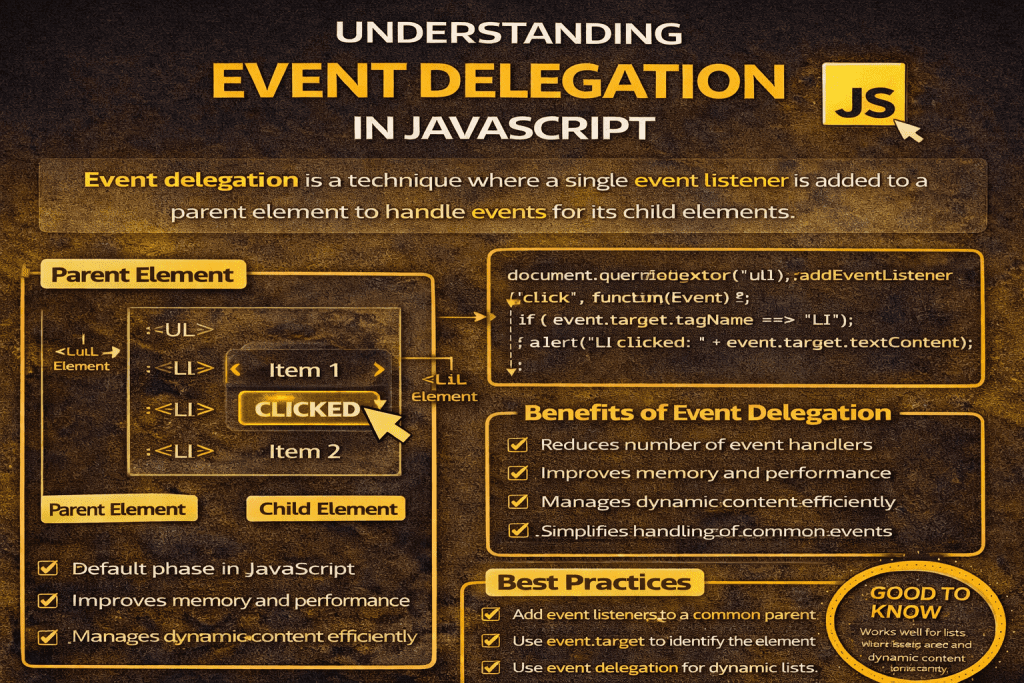
Event delegation is a JavaScript technique where instead of attaching event listeners to multiple child elements, you attach a single event listener to a parent element and let events “bubble up” from the children.
When an event occurs on a child element, it bubbles up through its ancestors, and the parent’s event listener can detect it. You then check which child triggered the event and handle it accordingly.
Why use event delegation?
✅ Performance – Instead of attaching many listeners to multiple elements, you only attach one to a common ancestor.
✅ Dynamic elements – It works even for elements added to the DOM later (since the listener is on the parent, not the child).
✅ Cleaner code – Fewer event bindings make code easier to maintain.
Example without delegation
// Adding event listeners to each button separately
const buttons = document.querySelectorAll(".btn");
buttons.forEach(button => {
button.addEventListener("click", () => {
console.log("Button clicked:", button.innerText);
});
});
Example with delegation
// Attach one listener to the parent
document.querySelector("#button-container").addEventListener("click", function(e) {
if (e.target.classList.contains("btn")) {
console.log("Button clicked:", e.target.innerText);
}
});
Here:
#button-containeris the parent.- The event listener checks if the actual target (
e.target) has the classbtn. - This way, it works even if new buttons are added dynamically.
👉 In short: Event delegation = listening at a higher level, acting at a lower level.
