
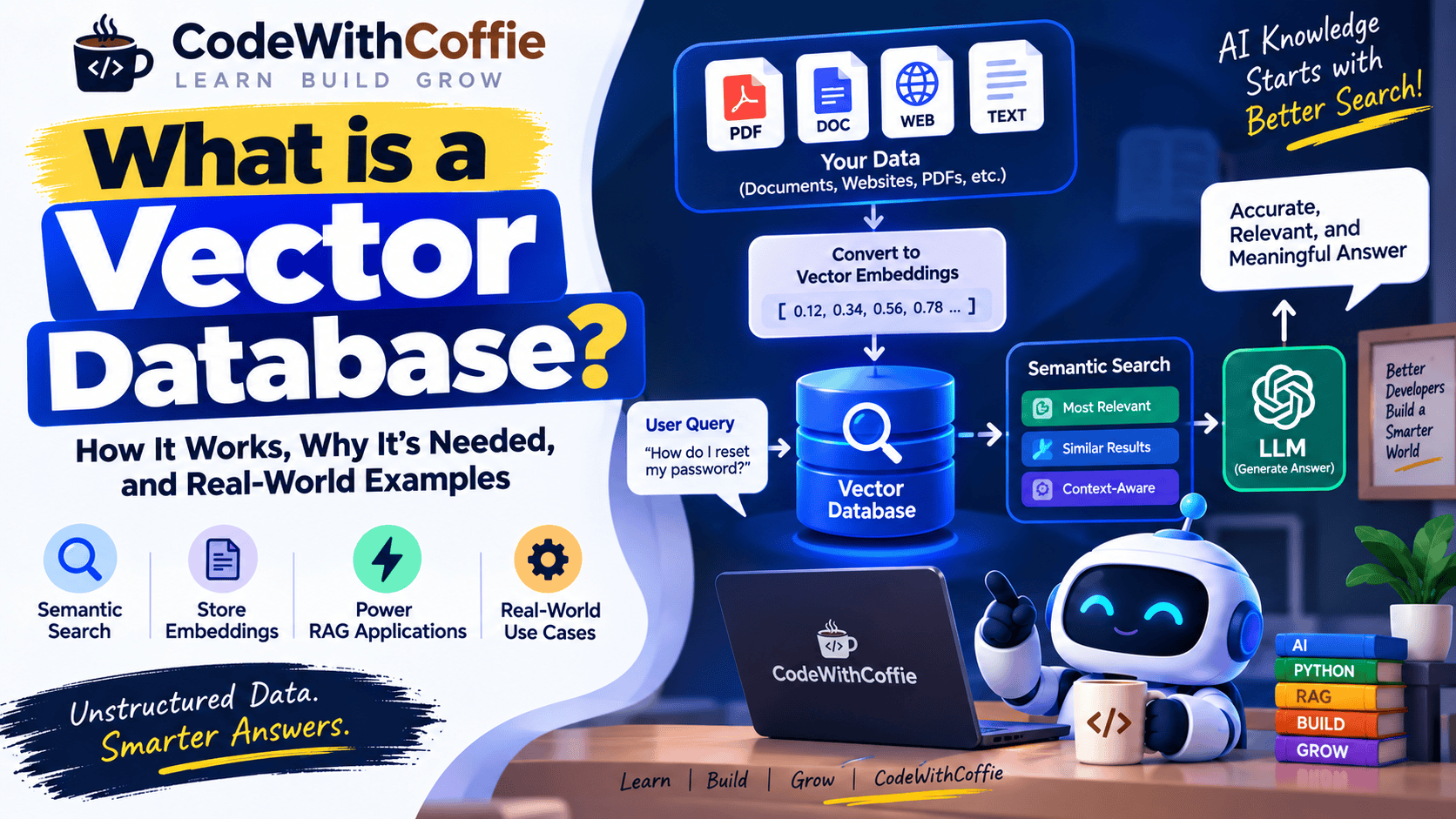
What is a Vector Database? Complete Guide with Examples
Vector databases have become an important part of modern Artificial Intelligence (AI) and Generative AI applications.
If you are learning RAG (Retrieval-Augmented Generation), AI chatbots, semantic search, recommendation systems, or AI-powered applications, you will frequently come across the term Vector Database.
Traditional databases are designed to store structured information such as names, emails, prices, orders, and transactions. Vector databases are designed to store and search vector embeddings, allowing applications to find information based on semantic similarity and meaning.
In simple words:
A Vector Database stores numerical representations of data called vectors and helps AI applications quickly find similar and relevant information.
In this article, you will learn:
- What a Vector Database is
- What a vector is
- What embeddings are
- Why Vector Databases are needed
- How Vector Databases work
- What vector search is
- Vector Database vs SQL Database
- The role of Vector Databases in RAG
- Popular Vector Databases
- Real-world use cases
- Advantages and limitations
- How developers can learn Vector Databases
What is a Vector Database?
A Vector Database is a specialized database designed to store, index, and search vector embeddings efficiently.
AI models can convert text, images, audio, and other types of information into numerical representations called embeddings.
For example:
"Python is a programming language"An embedding model may convert this text into a vector such as:
[0.21, 0.73, 0.18, 0.92, 0.44, ...]Real-world embeddings usually contain many more dimensions than this simplified example.
The Vector Database stores these vectors and allows an application to search for vectors that are similar to a given query vector.
What is a Vector?
A vector is essentially a collection of numbers.
For example:
[0.25, 0.71, 0.13, 0.88]In AI applications, vectors can represent the characteristics or semantic meaning of data.
For example:
"I love Python programming"and:
"Python is my favorite programming language"use different words, but their meanings are similar.
An embedding model can convert both sentences into numerical vectors that are relatively close to each other in a semantic vector space.
This allows an AI application to find related information even when the exact words are different.
What is an Embedding?
An embedding is a numerical representation of data.
For text-based AI applications, an embedding model converts text into a vector.
The basic process looks like this:
Text
  ↓
Embedding Model
  ↓
Vector
For example:
"How do I reset my password?"could be represented conceptually as:
[0.12, 0.83, 0.41, 0.67, ...]Another sentence:
"I forgot my password"could produce another vector:
[0.15, 0.80, 0.43, 0.64, ...]The exact numbers are not important for understanding the concept. What matters is that semantically similar text can produce vectors that are close according to a similarity measure.
Why Do We Need a Vector Database?
Traditional databases are excellent for structured data and exact queries.
For example:
SELECT * FROM users
WHERE name = 'Rahul';
This works very well when you know the exact value you want to search for.
But AI applications often need to answer questions based on meaning, not just exact words.
Suppose your database contains:
Python is a popular programming language used
for web development, automation, data science,
and artificial intelligence.
A user asks:
Which programming language can be used for AI development?The user didn’t use the exact sentence stored in the database.
A semantic search system can recognize that the question is related to the information about Python and AI development.
This is one of the main reasons Vector Databases are useful.
Keyword Search vs Semantic Search
There are two important concepts to understand.
Keyword Search
Keyword search mainly looks for matching words or terms.
For example:
Query:
Python programming
The search engine looks for documents containing relevant keywords.
Semantic Search
Semantic search focuses on the meaning of the query.
For example:
Query:
Which language is useful for building AI applications?
A semantic search system may retrieve:
Python is widely used for artificial intelligence
and machine learning applications.
Even though the wording is different, the concepts are related.
This is where embeddings and vector search become useful.
How Does a Vector Database Work?
A simplified Vector Database workflow looks like this:
Documents
    ↓
Text Extraction
    ↓
Text Chunks
    ↓
Embeddings
    ↓
Vector Database
When a user asks a question:
User Question
    ↓
Query Embedding
    ↓
Vector Search
    ↓
Similar Vectors
    ↓
Relevant Information
If the system is being used for RAG, the retrieved information can then be sent to an LLM:
Relevant Context
       +
User Question
       ↓
      LLM
       ↓
Final Answer
Step-by-Step Vector Database Example
Let’s understand the process using a simple example.
Suppose you have a company document containing:
Our refund policy allows customers to request
a refund within 30 days of purchase.
Step 1: Extract the Text
The application reads the document and extracts the text.
Our refund policy allows customers to request
a refund within 30 days of purchase.
Step 2: Create an Embedding
The text is passed to an embedding model.
Text
 ↓
Embedding Model
 ↓
Vector
The resulting vector might look conceptually like:
[0.24, 0.71, 0.19, 0.82, ...]Step 3: Store the Vector
The vector and related information are stored in a Vector Database.
Conceptually:
Vector
+
Document ID
+
Metadata
+
Original Text
Step 4: User Asks a Question
The user asks:
Can I get my money back after buying the product?This question is converted into another embedding.
User Question
      ↓
Embedding Model
      ↓
Query Vector
Step 5: Similarity Search
The Vector Database compares the query vector with stored vectors.
It finds the most relevant information:
Our refund policy allows customers to request
a refund within 30 days of purchase.
Step 6: Generate the Answer
In a RAG application, this retrieved information can be provided to an LLM.
The LLM may generate:
Yes. According to the refund policy, customers
can request a refund within 30 days of purchase.
This is the basic idea behind using a Vector Database in RAG.
What is Vector Search?
Vector Search is a search technique that finds data based on the similarity between vectors.
Instead of asking:
“Does this document contain the exact keyword?”
the system asks:
“Which stored information is most similar to this query?”
For example:
User Query
    ↓
Query Vector
    ↓
Similarity Search
    ↓
Top Matching Vectors
    ↓
Relevant Documents
What is Similarity Search?
Similarity search determines how closely two vectors are related.
Several mathematical techniques can be used to measure similarity or distance.
Common approaches include:
- Cosine similarity
- Euclidean distance
- Dot product
The exact method depends on the vector database, embedding model, and application.
What is Cosine Similarity?
Cosine similarity is a commonly used method for comparing vectors.
It measures the angle between two vectors.
Conceptually:
Vector A
   ↘
    ↘
     ↘
      Vector B
If two vectors point in similar directions, their cosine similarity is higher.
For example:
Text A:
How can I reset my password?

Text B:
I forgot my password. How do I change it?
These sentences have similar meanings, so their embeddings may have a high semantic similarity.
Vector Database in RAG
One of the most important applications of Vector Databases is RAG — Retrieval-Augmented Generation.
A typical RAG system looks like this:
                Documents
                    ↓
              Text Extraction
                    ↓
                Chunking
                    ↓
                Embeddings
                    ↓
             Vector Database
                    ↓
                  Search
                    ↑
                    │
              User Question
                    ↓
             Query Embedding
                    ↓
            Relevant Documents
                    ↓
                   LLM
                    ↓
               Final Answer
The Vector Database acts as the retrieval layer.
Why is a Vector Database Important for RAG?
Imagine you have:
10,000 PDFsA user asks:
What is the company's leave policy?You don’t want to send all 10,000 documents to the LLM.
Instead, the RAG application can:
10,000 Documents
       ↓
Vector Database
       ↓
Find Relevant Information
       ↓
Top Relevant Chunks
       ↓
LLM
       ↓
Answer
This makes the system more practical and efficient.
Vector Database vs SQL Database
Vector Databases and SQL databases are designed for different types of workloads.
| Feature | SQL Database | Vector Database |
|---|---|---|
| Primary data type | Structured data | Vector embeddings |
| Typical search | Exact/filter-based | Similarity-based |
| SQL queries | Yes | Usually not the primary interface |
| Semantic search | Not its main purpose | Core capability |
| AI embeddings | Can store them, but not the primary purpose | Designed for them |
| RAG applications | Supporting role | Common retrieval layer |
| Transactions | Strong support | Depends on system |
| Structured business data | Excellent | Not the primary use case |
This doesn’t mean Vector Databases replace SQL databases.
In many real-world AI systems, both can be used together.
Can SQL Databases Store Vectors?
Yes.
Some traditional and modern database systems can store vector data and support vector similarity search.
Therefore, the choice isn’t always:
SQL OR Vector DatabaseIt can also be:
SQL Database
      +
Vector Search
The right architecture depends on your application requirements, database capabilities, scale, and operational constraints.
SQL Database + Vector Database
A real-world application may use both.
For example:
                  Application
                      │
          ┌───────────┴───────────┐
          ↓                       ↓
    SQL Database            Vector Database
          │                       │
 User Information          Document Embeddings
 Orders                    Semantic Search
 Payments                  RAG Retrieval
The SQL database can manage structured business data.
The Vector Database can handle semantic retrieval.
What is Metadata in a Vector Database?
Metadata is additional information stored alongside a vector.
For example:
Vector:
[0.21, 0.73, 0.19, ...]

Metadata:
{
    "document": "refund-policy.pdf",
    "category": "policy",
    "department": "support",
    "page": 12
}
Metadata can be used to filter search results.
For example:
Search only documents
where category = "policy"
This can make retrieval more precise.
What is a Vector Index?
A Vector Index is a data structure that helps a Vector Database search through large numbers of vectors efficiently.
Without an appropriate index, comparing a query against every stored vector can become expensive as the dataset grows.
Vector databases use specialized indexing and approximate nearest-neighbor techniques to make similarity search faster.
Examples of indexing approaches include:
- HNSW
- IVF
- Product Quantization
- Approximate Nearest Neighbor methods
The exact options depend on the database.
What is HNSW?
HNSW stands for Hierarchical Navigable Small World.
It is a popular graph-based indexing technique used for approximate nearest-neighbor search.
You don’t need to understand the mathematics to start building RAG applications.
At a high level:
Large Number of Vectors
          ↓
      HNSW Index
          ↓
Fast Similarity Search
It helps Vector Databases find similar vectors efficiently.
Popular Vector Databases
Several Vector Database technologies are commonly used in AI applications.
1. Pinecone
Pinecone is a managed vector database platform designed for AI and semantic search workloads.
It can be used for applications such as:
- RAG
- Semantic search
- Recommendation systems
- AI assistants
2. Qdrant
Qdrant is a vector search engine/database commonly used for semantic search and RAG applications.
It provides vector similarity search and metadata filtering.
3. Weaviate
Weaviate is a vector database designed for AI applications and supports vector search, hybrid search, and metadata filtering.
4. Milvus
Milvus is an open-source vector database designed for large-scale vector similarity search and AI workloads.
5. Chroma
Chroma is commonly used by developers for AI prototypes, experimentation, and applications involving embeddings and retrieval.
6. FAISS
FAISS (Facebook AI Similarity Search) is a library developed by Meta for efficient similarity search and clustering of dense vectors.
FAISS is often used directly as a vector search library rather than as a full traditional database system.
Vector Database Use Cases
Vector Databases are used in many AI applications.
1. RAG Chatbots
A company can build a chatbot that answers questions using:
- Company documents
- Product documentation
- FAQs
- Internal policies
2. Semantic Search
Instead of matching only exact keywords, users can search using natural language.
For example:
Find documents about employee leave.The system can retrieve documents related to:
Annual Leave Policy
Employee Vacation Rules
Paid Time Off
Holiday Policy
even when the exact phrase differs.
3. PDF Question Answering
Users can upload a PDF and ask questions about it.
PDF
 ↓
Text
 ↓
Chunks
 ↓
Embeddings
 ↓
Vector Database
 ↓
Question
 ↓
Relevant Content
4. Recommendation Systems
Vector embeddings can represent products, users, articles, or other content.
The system can then find items that are semantically or behaviorally similar.
For example:
User likes:
Programming + AI + Python

      ↓

Similar Content
5. Document Search
Companies with thousands or millions of documents can use vector search to find relevant content based on meaning.
6. AI Customer Support
A customer support system can retrieve relevant:
- FAQs
- Product manuals
- Troubleshooting guides
- Policies
and provide that information to an LLM.
Advantages of Vector Databases
1. Semantic Search
Vector Databases can retrieve information based on semantic similarity.
2. Useful for RAG
They provide an important retrieval layer for many RAG architectures.
3. Fast Similarity Search
Specialized indexes make similarity search practical across large vector collections.
4. Supports Unstructured Data
They are useful for applications involving:
- Text
- Images
- Audio
- Documents
when those items have been represented using appropriate embeddings.
5. Metadata Filtering
Many Vector Databases support filtering based on metadata.
For example:
category = "technical"
language = "English"
department = "Engineering"
This can improve retrieval quality.
Limitations of Vector Databases
Vector Databases are powerful, but they also have limitations.
1. Embedding Quality Matters
Poor embeddings can lead to poor retrieval.
Bad Embeddings
      ↓
Bad Search Results
      ↓
Poor AI Answer
2. Chunking Matters
If documents are split incorrectly, important context may be lost.
For example:
Chunk 1:
The refund policy says...

Chunk 2:
...customers have 30 days.
If these pieces are poorly separated, retrieval may become less effective.
3. Storage Costs
Large numbers of high-dimensional vectors can require significant storage and infrastructure.
4. Retrieval is Not Perfect
A Vector Database may retrieve information that is similar but not actually the best answer.
This is why production RAG systems often use techniques such as:
- Metadata filtering
- Hybrid search
- Reranking
- Query rewriting
- Better chunking
- Retrieval evaluation
Vector Search vs Traditional Search
Let’s compare them.
Traditional Keyword Search
Query:
Python tutorial

Search:
Documents containing "Python"
and "tutorial"
Vector Search
Query:
I want to learn Python programming.

Search:
Documents semantically related
to learning Python.
The second approach can find relevant information even when the wording is different.
Hybrid Search
Modern AI applications don’t always choose between keyword search and vector search.
They can combine both.
This is called Hybrid Search.
Conceptually:
User Query
     ↓
 ┌───────────────┐
 ↓               ↓
Keyword Search   Vector Search
 ↓               ↓
 └───────┬───────┘
         ↓
    Combined Results
         ↓
       Ranking
         ↓
    Relevant Results
Hybrid search can be useful when both exact terms and semantic meaning matter.
Vector Database in a Real AI Application
Imagine you are building an AI assistant for CodeWithCoffie.
You have hundreds of tutorials:
Python
Laravel
PHP
JavaScript
AI
RAG
Machine Learning
A user asks:
How can I create a REST API using Python?The system can:
User Question
      ↓
Create Query Embedding
      ↓
Vector Database
      ↓
Find Relevant Tutorials
      ↓
Retrieve Top Results
      ↓
Send Context to LLM
      ↓
Generate Answer
The assistant can then answer using the relevant CodeWithCoffie content.
Vector Database Architecture
A simple architecture looks like this:
                DATA SOURCES
                     │
          ┌──────────┼──────────┐
          ↓          ↓          ↓
        PDFs      Website    Database
          │          │          │
          └──────────┼──────────┘
                     ↓
               Data Processing
                     ↓
                 Chunking
                     ↓
                Embeddings
                     ↓
             Vector Database
                     │
                     │
User Question ───────┤
                     ↓
              Query Embedding
                     ↓
              Similarity Search
                     ↓
             Relevant Documents
                     ↓
                    LLM
                     ↓
               Final Answer
Vector Database vs Traditional Database: Simple Example
Suppose you have an e-commerce website.
Your SQL database may contain:
Products
Orders
Customers
Payments
Addresses
Your Vector Database may contain:
Product Embeddings
Product Descriptions
FAQ Embeddings
Documentation
Support Articles
The two databases can work together.
SQL Database
→ Structured business information

Vector Database
→ Semantic information retrieval
Do You Always Need a Vector Database for RAG?
No.
RAG is an architecture, not a requirement to use one specific database.
A retrieval system can use different search technologies depending on the application.
However, Vector Databases are commonly used when semantic similarity search over embeddings is required.
Some databases now provide built-in vector search capabilities, so you may not always need a separate dedicated Vector Database.
Vector Database Learning Roadmap
If you want to become an AI developer, you can learn Vector Databases in this order:
Step 1: Learn Python
Understand:
- Variables
- Functions
- Lists
- Dictionaries
- Classes
- File handling
- APIs
Step 2: Learn AI Basics
Understand:
- LLMs
- Tokens
- Prompts
- Context windows
Step 3: Learn Embeddings
Understand:
- What embeddings are
- How text becomes vectors
- Dimensions
- Similarity
Step 4: Learn Vector Search
Understand:
- Similarity search
- Cosine similarity
- Euclidean distance
- Dot product
- Nearest-neighbor search
Step 5: Learn a Vector Database
Start with one technology such as:
Qdrantor:
ChromaThen explore other technologies.
Step 6: Build a RAG Project
Build something practical:
PDF
 ↓
Text Extraction
 ↓
Chunking
 ↓
Embeddings
 ↓
Vector Database
 ↓
Question
 ↓
Retrieval
 ↓
LLM
 ↓
Answer
Simple RAG Project Idea
You can build a PDF AI Chatbot.
Features:
- Upload PDF
- Extract text
- Split text into chunks
- Generate embeddings
- Store vectors
- Ask questions
- Retrieve relevant chunks
- Generate answers
Architecture:
                PDF
                 ↓
            Text Extraction
                 ↓
              Chunking
                 ↓
             Embeddings
                 ↓
          Vector Database
                 ↑
                 │
             User Query
                 ↓
          Similarity Search
                 ↓
          Relevant Chunks
                 ↓
                LLM
                 ↓
              Answer
This is one of the best beginner projects for understanding how Vector Databases work with RAG.
Frequently Asked Questions
What is a Vector Database in simple words?
A Vector Database is a database designed to store and search numerical representations of data called vectors.
Why are Vector Databases used in AI?
They are commonly used to perform semantic similarity searches, allowing AI applications to retrieve information based on meaning.
What is a vector embedding?
An embedding is a numerical representation of data, such as text, that captures useful semantic or feature information.
Is Vector Database the same as SQL Database?
No. SQL databases are primarily designed for structured data and queries, while Vector Databases are optimized for vector similarity search. Some modern databases can support both types of workloads.
Is Vector Database required for RAG?
Not always. RAG can use different retrieval technologies, but Vector Databases are commonly used when semantic search with embeddings is required.
Which Vector Database should beginners learn?
Qdrant, Chroma, or another beginner-friendly vector search technology can be a good starting point. After understanding the fundamentals, you can explore other systems such as Pinecone, Weaviate, and Milvus.
What is the difference between a Vector Database and embeddings?
An embedding is the numerical representation of data.
A Vector Database stores and searches those representations.
Text
 ↓
Embedding
 ↓
Vector
 ↓
Vector Database
Can Vector Databases store images?
Yes. Images can be converted into embeddings using suitable embedding models and those vectors can then be stored and searched.
Are Vector Databases only used for RAG?
No. They can also be used for semantic search, recommendation systems, similarity search, image search, document retrieval, and other AI applications.
Conclusion
A Vector Database is an important technology in modern AI applications.
It allows applications to store and efficiently search vector embeddings, making it possible to find information based on semantic similarity rather than only exact keyword matches.
The basic concept is:
Data
 ↓
Embedding
 ↓
Vector
 ↓
Vector Database
 ↓
Similarity Search
 ↓
Relevant Information
In RAG applications, the Vector Database works as the retrieval layer:
User Question
      ↓
Vector Search
      ↓
Relevant Information
      ↓
LLM
      ↓
AI Answer